10 Best Wireless Gaming Keyboards in 2026
Disclosure: As an Amazon Associate we earn from qualifying purchases.
AULA F75 Pro is the pick for players who want tri-mode connectivity, hot-swap flexibility, and a compact layout with a control knob.
Choosing wireless gaming keyboards gets tricky when you want less cable clutter without giving up fast controls, lighting, or a layout that still feels comfortable. The right pick depends on how you switch devices, how much desk space you want, and which extras matter most to you.
These picks suit different setups, from compact boards with quiet typing to combo kits with matching mice.
Top Picks
Top 10 Wireless Gaming Keyboards Review
Pros and cons are taken from each product's listing details.
AULA F75 Pro Wireless Mechanical Keyboard

- Tri-mode connectivity
- Hot-swappable switch support
- Compact 75% layout
AULA’s F75 Pro is a compact 75% board for people who want flexible connections and customization in one setup. It works over Bluetooth 5.0, 2.4GHz wireless, or USB wired mode, and it can connect to five devices with quick switching. The 4000mAh battery supports longer use between charges, and the knob adds simple control over lighting and media.
It also stands out for hot-swap support with 3-pin or 5-pin switches, pre-lubricated stabilizers, and side-printed PBT keycaps. The RGB lighting offers many preset effects, while the layout keeps arrow keys and adds macro programming, N-key rollover, and WIN key lock. This suits you if you want a small board with broad device support and plenty of tweak options.
Redragon S101M-KS Gaming Keyboard and Mouse Wireless with Tri-Mode

- Tri-mode connection
- Adjustable RGB lighting
- Programmable keys and mouse
Redragon’s S101M-KS is a keyboard-and-mouse combo for people who want one wireless setup with matching controls. It supports wired, Bluetooth, and 2.4G connection modes, and the 2-in-1 receiver can control both pieces at once. The keyboard adds 10 independent multimedia keys, 12 combination multimedia keys, splash resistance, and a removable USB-C cable.
The mouse brings 4800 DPI with five levels, and both pieces can be customized through software for keys, lighting, DPI, polling rate, and button remapping. The RGB lighting has eight patterns, and the keyboard is described with a long runtime when RGB is off. This fits you if you want one shared wireless desk setup with extra media control.
RedThunder K10 Wireless Gaming Keyboard and Mouse Combo

- Stable 2.4G connection
- Backlit keyboard and mouse
- Shared USB receiver
RedThunder’s K10 is a keyboard-and-mouse combo built around wireless convenience and simple setup. It uses 2.4G transmission, shares one USB receiver, and comes ready for plug-and-play use. The keyboard has a 3000mAh battery, the mouse has an 800mAh battery, and the pair is described as supporting eight hours of use with light.
The lighting is busy and colorful, with rainbow effects on the keyboard and a seven-color gradual effect on the mouse. The keyboard also uses ABS keycaps with two-color injection molding and a metal cover, while the mouse is shaped for palm comfort. Choose this one if you want a matched set with backlighting and straightforward wireless use.
LexonElec Wireless Gaming Keyboard and Mouse
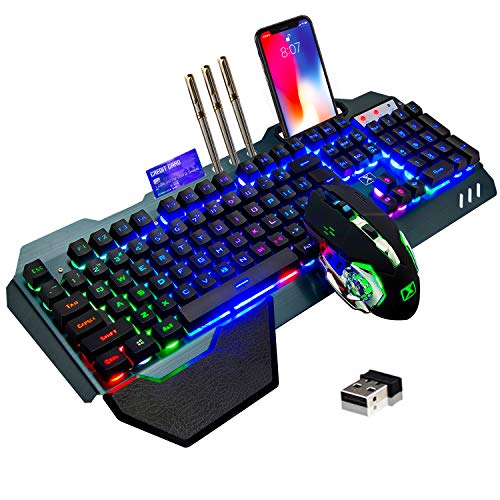
- Aluminum alloy panel
- Removable hand rest
- Built-in phone bracket
LexonElec’s combo is built for people who want a sturdier-feeling wireless setup with a few comfort extras. The keyboard uses an aluminum alloy brushed panel and a 3000mAh battery, while the mouse has an 800mAh battery. It connects through 2.4G wireless with one shared receiver, and it sleeps after five minutes of inactivity.
The board adds a removable hand rest, floating keycaps, multimedia shortcuts, and a phone bracket for keeping a device close at hand. The mouse includes six buttons, a metal roller, and four DPI steps from 800 to 2400. This is a strong fit if you want a full-size desk companion with practical extras.
CHONCHOW 60% Wireless Gaming Keyboard and Mouse Combo

- 60% compact layout
- 10-meter wireless range
- Adjustable backlight
CHONCHOW’s 60% combo is made for people who want a smaller desktop footprint and easy wireless setup. The keyboard uses a 68-key layout, a 2.4G connection, and one shared USB adapter, with a 10-meter effective distance. The keyboard battery is 2000mAh, and the mouse battery is 500mAh.
Its backlighting gives you four brightness levels and three breathing speeds, while the mouse adds seven colors. The board is described as working with multiple systems and has 19-key conflict-free operation in USB mode. Choose this if you want a space-saving combo that still keeps the lighting and wireless features.
DIERYA DK63 60% Wireless Mechanical Gaming Keyboard

- Red switches
- Three connection modes
- Long standby time
DIERYA’s DK63 suits people who want a small wireless board with quieter typing and a simple layout. It has 63 keys, including directional keys, and uses red switches with a light linear feel. The board supports 2.4G, Bluetooth 5.0, and wired USB connection, so it can move between devices more easily.
The 3000mAh battery is described with about eight hours of use at maximum backlight intensity, about 90 hours with the backlight off, and standby time up to 360 hours. RGB lighting gives you 18 modes and 16.8 million colors. This is a good fit if you want a quiet compact keyboard with more connection options.
Logitech G PRO X 60% Wireless Gaming Keyboard

- LIGHTSPEED wireless
- Optical switches
- Carry case included
Logitech G’s PRO X 60 is aimed at players who want a compact wireless board with pro-oriented controls. It uses LIGHTSPEED wireless with a 1 ms response rate, and it also supports Bluetooth and optional USB connectivity. The board includes media controls, a volume roller, and customizable LIGHTSYNC RGB through G HUB.
GX optical switches are available in tactile or linear versions, and KEYCONTROL lets you customize every key across five layers. The included carrying case makes it easier to move between setups. Pick this if you want an ultra-compact board built around speed, layered control, and portability.
Razer BlackWidow V4 TKL Wireless Gaming Keyboard

- Hot-swappable switches
- Multi-function roller
- Long battery life
Razer’s BlackWidow V4 TKL is for people who want a wireless board with strong control features and a quieter tactile feel. It supports HyperSpeed Wireless and up to three Bluetooth devices, and it comes with hot-swappable support for 3-pin and 5-pin switches. The pre-installed Orange Tactile Switches Gen-3 are paired with sound-dampening layers and a stainless-steel plate.
The multi-function roller and three dedicated control buttons handle media, audio, device, and battery functions, and the lighting uses Razer Chroma RGB with per-key customization. The battery life is described as up to 980 hours in Bluetooth mode. Choose this if you want a TKL board with deep customization and long runtime.
Klymra DK75 75% Wireless Gaming Keyboard

- OLED screen
- Rotary knob controls
- PBT keycaps
Klymra’s DK75 is a 75% wireless board for people who want a quieter feel with a clear status display. It offers Bluetooth 5.0, 2.4GHz wireless, and USB wired modes, and it uses silent membrane switches. The screen shows battery and connection status, while the rotary knob handles volume or brightness.
It also includes 15 RGB effects, adjustable brightness and speed, and PBT keycaps meant to resist oil and wear. The 4000mAh rechargeable battery is paired with auto-sleep and USB-C charging. This suits you if you want a compact board with membrane quietness, a display, and simple hardware controls.
GravaStar Mercury K1 Lite 75% Wireless Mechanical Gaming Keyboard RGB

- Gasket-mounted structure
- Transparent PC chassis
- Tri-mode wireless
GravaStar’s Mercury K1 Lite is built for people who want a compact wireless board with a distinctive look and a controlled typing feel. It uses custom linear switches with 2 mm pre-travel and 3.6 mm total travel, plus a gasket-mounted structure with five-layer foam dampening. The 75% layout keeps the desk footprint small.
It supports wired, Bluetooth, and 2.4GHz wireless modes, and the transparent PC chassis and clear keycaps give it a bold style. The 4000mAh battery and included Type-C cable round out the package. Pick this if you want a fast-feeling compact board with a softer acoustic profile and a standout design.
How to Choose Wireless Gaming Keyboards
Connection Options
Start with how you plan to use the board. Some models switch between Bluetooth, 2.4GHz, and wired USB, while others focus on a single wireless path. If you move between a desktop, laptop, tablet, or phone, broader compatibility can save time and reduce pairing hassles.
Pay attention to how easy the switch is during use. Shortcut keys, a receiver, or a dedicated mode button can make a difference when you move from play to work. A board that handles more than one device is often easier to live with day to day.
Layout and Size
Layout affects both comfort and desk space. A 60% or 75% board leaves more room for mouse movement, while a larger design may keep more keys close at hand. Think about whether you need arrow keys, media controls, or a more compact footprint for tight setups.
Your choice should match the way you play and type. Smaller boards suit minimal desks and mouse-heavy games, while fuller layouts help if you use shortcuts often. The right balance comes from how much of the board you want within easy reach.
Lighting and Controls
Lighting is not just decoration. Brightness steps, preset effects, and per-key options can make the board easier to read in dim rooms and easier to personalize. Some models also let you adjust lighting without opening software, which can keep things simpler.
Look for extra controls that match your routine. A knob, roller, or dedicated buttons can handle volume, lighting, or media faster than key combinations alone. If you change settings often, those controls can be more useful than flashy effects.
More to Consider for Wireless Gaming Keyboards
Battery Runtime
Battery size matters most if you plan to use the board away from a cable for long stretches. Larger capacities can reduce how often you recharge, but lighting and connection mode can affect run time. If you leave RGB on all the time, check how the listing describes usage with lighting enabled versus off.
Switch Feel
The switch type changes how the board feels under your fingers. Linear switches usually feel smoother, tactile switches add a bump, and membrane designs tend to sound and feel different again. If you are picky about typing feel, this is one of the most important details to compare before buying.
Desk Space
A smaller keyboard can change how much room you have for a mouse and other gear. Compact layouts are useful when you play with low sensitivity or work on a crowded desk. Measure the area where the board will sit and think about whether you want extra space left over for wide mouse movement.
Frequently Asked Questions
How do I choose between a compact board and a fuller layout?
AULA keeps a 75% layout with arrow keys and a knob, so it balances space savings with useful controls. DIERYA uses 63 keys, which is even smaller and more minimal.
Which pick has the longest listed wireless runtime?
Razer lists up to 980 hours in Bluetooth mode, which is the longest runtime shown here. Redragon describes a long runtime with RGB off, and DIERYA lists about 90 hours with the backlight off and standby up to 360 hours.
Which option is strongest for switching between multiple devices?
AULA stands out with Bluetooth 5.0, 2.4GHz wireless, USB wired use, and support for up to five devices. Klymra also offers Bluetooth 5.0, 2.4GHz wireless, and USB wired mode.
Which one is the quietest-feeling choice?
DIERYA is the clearest quiet pick because it uses red switches with a light linear feel and low noise. Klymra uses silent membrane switches, which also points toward quieter typing. Razer adds sound-dampening layers with its tactile switches, so it aims for a more controlled sound than a bare mechanical build.
Which model gives the most control over lighting and media?
AULA includes a multifunction knob for lighting and media, and Redragon lets you adjust lighting and key functions through software.
Final Verdict
AULA is the top pick because the F75 Pro combines tri-mode connection, support for up to five devices, hot-swap switch replacement, a 4000mAh battery, and a compact 75% layout with a control knob.
Redragon works well if you want a keyboard-and-mouse combo with software control and a shared receiver. Razer is the choice for hot-swap TKL use with very long Bluetooth runtime.