10 Best Document Scanners in 2026
Disclosure: As an Amazon Associate we earn from qualifying purchases.
ScanSnap iX2500 is the pick for busy users who want fast, connected scanning with a large touchscreen and a 100-sheet feeder.
Choosing document scanners gets harder when you need speed, portable size, or simple file handling in the same device. You may also want support for receipts, photos, or cloud storage without adding extra steps.
These picks suit different scanning habits, from desktop batch jobs to grab-and-go use.
Top Picks
Top 10 Document Scanners Review
Pros and cons are taken from each product's listing details.
ScanSnap iX2500 Wireless or USB High-Speed Document Scanner

- Large touchscreen
- Wi-Fi 6 connection
- 100-sheet feeder
ScanSnap iX2500 is a desktop scanner for people who want fast, connected handling and plenty of automation. It offers a large touchscreen, 45ppm double-sided scanning, a 100-sheet document feeder, and support for cloud services. The wireless connection can work through Wi-Fi 6, and USB-C is also available for a wired setup.
ScanSnap also focuses on paper handling and organization. The listing says it can manage documents, receipts, photos, and business cards, then optimize, name, and sort files automatically. If you want one machine that can move between a computer, mobile devices, and cloud services, this is the most complete-feeling option here.
Epson Workforce ES-50

- Compact mobile design
- Single-page scan speed
- USB-powered
Epson’s ES-50 is built for people who need a light scanner that travels easily with a laptop. It scans a single page in as quickly as 5.5 seconds, works with Windows and Mac, and connects by USB for simple setup. The scanner also handles documents up to 8.5 x 72 in.
Epson adds software that can review, save, and organize scans, plus OCR for searchable PDFs and editable Word and Excel files. It also supports cloud scanning and includes an automatic feeding mode that combines multi-page scans into one file. Choose this if you want a compact, USB-powered unit for quick desk or mobile use.
Canon Canoscan Lide 300 Scanner

- Auto-Scan Mode
- USB connection
- Simple document digitizing
Canon’s CanoScan LiDE 300 keeps things simple for straightforward document and image digitizing. It is a document scanner with USB connectivity and Auto-Scan Mode, which automatically detects what you are scanning. That makes it a clean choice for people who want a minimal setup.
Canon does not add a long list of extras here, so this model suits someone who mainly wants a basic wired scanner for home or office use. If your priority is simplicity over advanced handling or cloud features, this is the most stripped-back option in the roundup.
Brother DS-640 Compact Mobile Document Scanner

- Very compact body
- Color and black-and-white speed
- Multiple scan destinations
- Requires a PC or laptop
- No outlet-free battery operation
Brother’s DS-640 is aimed at users who want a compact scanner they can move around easily. It is less than 1 ft long, weighs about 5 lb, and runs through an included micro USB 3.0 cable. The listing says it scans color and black-and-white pages at up to 16ppm.
Brother also gives you flexible software support, with scan destinations that include PC, network, cloud services, email, and OCR. It works with Windows, Mac, and Linux, plus several driver types. Pick this if you want a small wired scanner that still covers multiple workflows and operating systems.
HP Small USB Document & Photo Scanner for Portable 1-Sided Sheetfed Digital

- Slim profile
- 1200 dpi resolution
- Portable sheetfed design
- No batteries or external power supply
HP’s HPPS100 is made for portable one-sided scanning when you want something easy to carry. It works with PC and Mac computers, plugs in by USB 2.0, and offers a compact profile for bags or briefcases. The listing also gives it a 1200 dpi resolution and support for PDF, JPG, and other file formats.
HP adds HP WorkScan software with auto-scan, size detection, preview, crop, edit, and background cleanup tools. It also handles a wide paper range and many document types, from receipts to photos. This fits a traveler or commuter who wants a small scanner that stays tethered to a computer.
Plustek PS186 Desktop Document Scanner
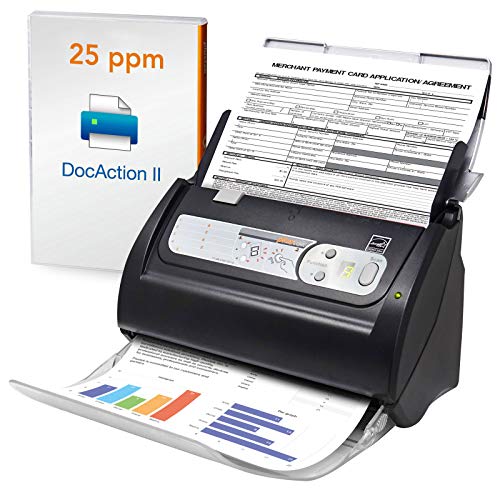
- 50-page ADF
- Searchable PDF output
- Barcode categorization
plustek’s PS186 is built for desktop users who process stacks of pages and want organized output. It includes a 50-page automatic document feeder, supports Windows 7/8/10, and can save scans as searchable PDF files with OCR included. The listing also adds a single-touch setup with up to 255 favorite scan file settings.
plustek stands out for barcode-based categorization and image cleanup tools such as auto rotate, crop, deskew, and blank page removal. It can also send files to FTP or a personal NAS in PDF, Jpeg, TIFF, or Png format. Choose this when batch handling and filing matter more than mobility.
VIISAN Document Camera & Book Scanner
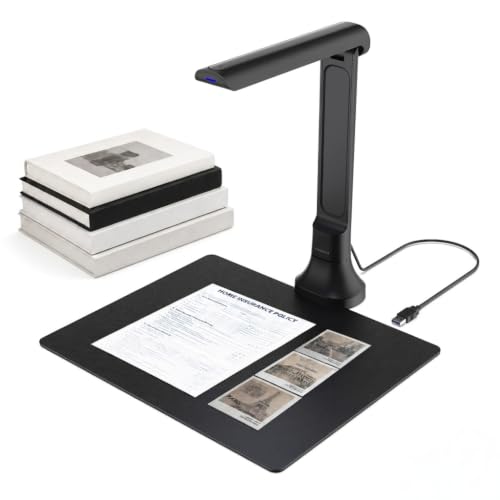
- 16MP camera
- OCR and read-aloud
- Foldable design
- No drivers needed only with plug-and-play use
- AI features depend on VisualCam Lite Web UI
VIISAN’s DB8401 is a document camera and book scanner for people who need more than a flatbed-style scanner. It uses a 16MP camera, works with Windows and macOS, and has an auto-focus lens for books, papers, photos, and 3D objects. The foldable design also helps save desk space.
VIISAN includes OCR, searchable text output, and a text-to-speech function that reads content aloud. It also supports multi-page scanning with automatic edge correction and works with video conferencing platforms such as Zoom and Teams. This is a strong fit for teaching, remote collaboration, and book capture.
Portable Document Scanner

- 900 dpi mode
- Handheld wand design
- Included SD card
AOZBZ’s handheld scanner is designed for people who want a simple wand-style tool for quick capture. It offers three resolution modes up to 900dpi, saves in JPG/PDF format, and includes a 16G SD card. The listing also says it works with Windows and Mac OS 10.4 or above.
AOZBZ keeps operation direct, with a scan button and automatic finish after three minutes without activity. It stores files on micro SD media and supports up to 32GB storage. This suits users who want a portable scanner for documents, images, or receipts without a desktop setup.
FUJITSU IX500 Scansnap Document Scanner

- Wireless scanning
- 50-page ADF
- Searchable PDF creation
- No mobile-device scan note beyond Mac, PC, iOS or Android
Fujitsu’s IX500 renewed scanner is built for users who want a fast feeder-based machine with wireless flexibility. It creates searchable PDFs with one button, scans up to 25 double-sided pages per minute, and includes a 50-page automatic document feeder. It can scan wirelessly to Mac, PC, iOS, or Android.
Fujitsu also supports scanning to the cloud without a computer or mobile device, which gives it a lot of flexibility for a refurbished unit. If you want a renewed desktop scanner with a strong feature set and simple PDF creation, this one deserves a close look.
Hczrc Portable Scanner

- No software installation
- 2 AA batteries
- Travel-friendly design
- 2 AA batteries not included
- Memory card required
Hczrc’s portable scanner is another handheld option for quick image and document capture. It offers up to 900dpi, saves JPEG/PDF files, and comes with a 16G SD card. The device is also described as compatible with Windows XP/7/Vista and Mac OS 10.4 or above.
Hczrc runs on 2 AA batteries and does not require software installation, which keeps the setup simple. It is also described as lightweight and travel-friendly, with storage on micro SD and USB reading support for a computer or phone. Pick it if you want a compact scanner that is ready for quick use outside the office.
How to Choose Document Scanners
Connection Type
Start with how you want to connect. USB models are usually the simplest for a single computer, while wireless units can move scans to more than one device or to cloud storage.
If you scan often, connection stability matters as much as speed. A wired model can feel more direct for daily office work, while wireless support can reduce cable clutter. Choose the connection style that fits your space and the devices you already use.
Paper Handling
Look at whether a scanner feeds one sheet at a time or uses an automatic document feeder. ADF models help when you have stacks of pages, while single-sheet designs can suit lighter jobs or more portable use. Also check whether it handles receipts, photos, cards, or longer pages.
Paper handling affects both speed and convenience. If your files are mixed and frequent, a feeder can save time. If you only scan a few pages at once, a simpler path may be enough and may take less desk space.
File Tools
Think about what happens after the scan. Some scanners only capture an image, while others add OCR, searchable PDFs, or export options like Word, Excel, or image files. Those tools matter if you need to file, edit, or search documents later.
Software can also change the experience a lot. Look for options that make review, naming, cropping, and sorting easier, especially if you deal with many pages. The right file tools can turn scanning from a chore into a short routine.
More to Consider for Document Scanners
Scan Resolution
Resolution affects how much detail the scanner can capture, especially for photos, small text, or receipts with fine print. Higher settings can be useful when you need a clearer archive copy, while lower settings may be enough for routine paperwork. Match the setting to the type of pages you handle most often.
Operating System
Check which computer systems the scanner supports before you buy. Some models work with Windows only, some add Mac support, and some go further with Linux or mobile devices. If you switch between devices, broad compatibility can save setup time and reduce frustration.
Power Source
Power matters for where and how you scan. USB-powered models are handy near a laptop or desktop, while battery-powered handheld designs can work away from an outlet. If you move around a lot, choose a power setup that matches that routine instead of forcing extra cables or chargers.
Frequently Asked Questions
What should I look for first when choosing one of these scanners?
Start with connection, feeding style, and the kind of files you want to make.
Which pick is easiest to carry around?
Brother is the most compact of the feeder-style options, with a body under 1 ft long and a weight of about 5 lb. Epson is also built for mobility and uses USB power. HP is another portable choice with a slim profile and USB 2.0 power.
Which option is best if I want searchable files?
Epson includes OCR for searchable PDFs and editable Word and Excel files. plustek also creates searchable PDF files with OCR included.
Final Verdict
ScanSnap stands out because it combines a large touchscreen, 45ppm double-sided scanning, a 100-sheet feeder, Wi-Fi 6, USB-C, and automatic file organization in one connected machine. It also handles documents, receipts, photos, and business cards, which makes it the strongest fit for busy users who want fewer steps.
Epson suits people who want a compact USB-powered unit with cloud and OCR support. Canon fits simple wired scanning. Brother is for a small mobile scanner with multiple destinations.