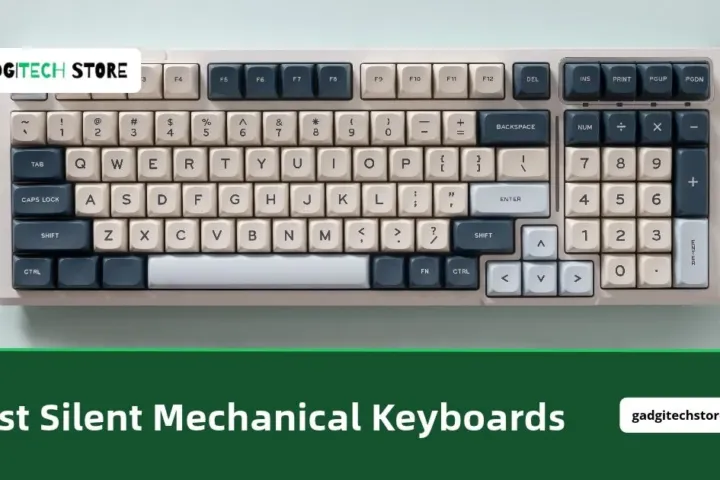
10 Best Quiet Mechanical Keyboards in 2026
Disclosure: As an Amazon Associate we earn from qualifying purchases.
SOLAKAKA KI99 Pro is the pick for quieter typing and flexible setup across work, gaming, and multiple devices.
When you want a mechanical board, noise can be the part that spoils the feel. Choosing quiet mechanical keyboards means sorting through layouts, switch types, and connection modes without guessing which details matter most to you.
These picks suit different setups, from compact desks to full-size workstations and gaming spaces.
Top Picks
Top 10 Quiet Mechanical Keyboards Review
Pros and cons are taken from each product's listing details.
SOLAKAKA KI99 Pro Wireless Mechanical Keyboard with Quiet Switch

- Silent switches
- Five noise-reducing layers
- Hot-swappable keys
- Control knob
SOLAKAKA's KI99 Pro centers on quieter typing with silent switches and five noise-reducing layers inside a gasket structure. It also brings a compact 96% layout, so you keep a smaller footprint without losing everyday control. The knob adds quick volume, media, and lighting changes, which suits busy desks.
The wireless setup covers BT5.0, 2.4G, and Type-C, and the board works with Windows, macOS, PC, laptop, and smartphone. Full hot-swappable support, PBT keycaps, and driver-based macros make it a fit for someone who wants a quieter board that still leaves room for personalization.
ProtoArc K310 Pro Backlit Bluetooth Mechanical Keyboard

- Linear quiet typing
- Up to 3 devices
- 10 backlight effects
- Programmable macros
- Aluminum top case
ProtoArc's K310 Pro leans into smooth, low-noise typing with low-profile linear red switches. The full-size layout and aluminum top case give it a more traditional feel, while the adjustable tilt legs help with long sessions at a desk. Its backlighting also adds a bit of flexibility for dim rooms.
This model can connect to up to 3 devices by USB receiver or Bluetooth, and it works across Windows, Mac, iOS, and Android. USB-C recharging and macro support make it a strong fit if you move between devices often and want one board to cover work and entertainment.
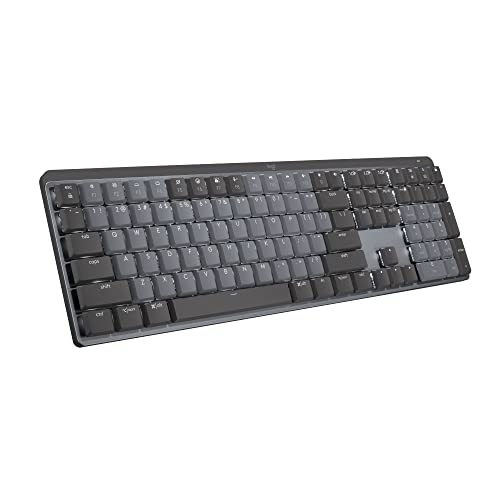
Logitech MX Mechanical Wireless Illuminated Keyboard Tactile
- Tactile quiet switches
- Smart illumination
- Up to 3 devices
- Flow cross-computer control
- Low-profile keys
Logitech's MX Mechanical focuses on tactile quiet switches with low-profile keys for a slimmer typing feel. Smart illumination turns the backlight on as your hands approach and adjusts to changing light, which keeps the board easy to use without extra fiddling. The full-size layout keeps everything familiar.
It pairs with up to 3 devices across nearly any operating system through Bluetooth Low Energy or the included Logi Bolt receiver. USB-C charging, Logi Options+ customization, and support for Flow cross-computer control make it a solid choice for mixed-device workspaces.
AULA F75 Pro Wireless Mechanical Keyboard

- Hot-swappable base
- Five device connection
- Multi-function knob
- Side-printed PBT keycaps
- Noise-dampening layers
AULA's F75 Pro combines a compact 75% layout with a hot-swappable base, so switch changes stay simple. The pre-lubricated stabilizers and LEOBOG reaper switches are built for a smoother feel, while the five-layer filling setup is aimed at reducing cavity noise. The side-printed PBT keycaps add a durable finish.
It connects by Bluetooth 5.0, 2.4GHz wireless, or USB wired mode and can handle up to five devices at once. The knob switches between gaming and office use, and the 16.8 million RGB lighting options give it plenty of room for customization.
SteelSeries Apex 3 Gaming Keyboard

- IP32 water resistant
- Magnetic wrist rest
- Dedicated multimedia controls
SteelSeries' Apex 3 keeps things simple with whisper quiet gaming switches and a full-size layout. The IP32 water resistant design adds a useful layer of spill protection, and the magnetic wrist rest gives you extra support during long sessions. It also includes dedicated multimedia controls.
The 10-zone RGB illumination offers color and effect options without making the board feel crowded. Compatibility covers Windows, macOS X, Xbox Series S, Xbox Series X, PS4, and PS5, so it suits users who want a quiet keyboard with broad system support.
Redragon Mechanical Gaming Keyboard Wired

- 11 backlight modes
- Hot-swappable switches
- Full anti-ghosting
- Macro editing
Redragon's wired K671 is built around hot-swappable linear red switches, which gives you a smoother press and easy switch replacement. The board also supports macro editing, so you can remap keys and combine functions for work or play. Full-key anti-ghosting keeps input handling straightforward.
Its 11 backlight modes let you change the look, and brightness adjusts across 5 levels. The 12 multimedia shortcuts add quick control over volume and media, while the included 24-Month Warranty gives the package a clear support detail.
RK ROYAL KLUDGE S98 Wireless Mechanical Keyboard w/Smart Display & Knob

- Smart display
- Knob control
- Hot-swappable PCB
- Sound-absorbing foams
RK ROYAL KLUDGE's S98 stands out with its smart display, which can show custom GIFs, date, connection mode, WIN/MAC layout, and battery status. The knob also manages volume, connection mode, backlight brightness and speed, and RGB settings, so the board keeps controls close at hand.
Its top-mount design, hot-swappable PCB, and double-shot PBT keycaps give it a custom-friendly feel. The sound-absorbing foams and dampening pads are described as reducing noise and hollow sound, and the board supports Bluetooth 5.0, 2.4G, and USB-C.
Logitech G413 SE Full-Size Mechanical Gaming Keyboard

- Black aluminum case
- 6-key rollover
- PBT keycaps
- FN media controls
Logitech G's G413 SE pairs tactile mechanical switches with a black-brushed aluminum top case. The full-size layout keeps it familiar, while the minimal-flex body design gives the board a sturdier feel. White LED lighting adds a clean look without changing the layout.
It includes 6-key rollover anti-ghosting and 12 FN media keys for volume, playback, and lighting control. PBT keycaps add wear resistance, and compatibility with Windows and macOS makes it a practical option for users who want a wired keyboard with a solid build.
X9 Performance Quiet Mechanical Keyboard

- Low-profile red switches
- Number pad
- Aluminum top case
- Three brightness levels
X9 Performance's X9 Slim uses low-profile red switches for smooth, quiet keystrokes with a laptop-style feel. The 107-key layout includes a number pad, 15 shortcut keys, a Copilot key, and a built-in volume knob, so the board is set up for work-heavy desks. The aluminum top case keeps it steady.
It connects through Bluetooth for 2 devices, 2.4GHz wireless, or wired USB-A/C, and the rechargeable 2000mAh battery supports days of wireless typing. White backlighting with 3 brightness levels keeps the legends visible without making the board look busy.
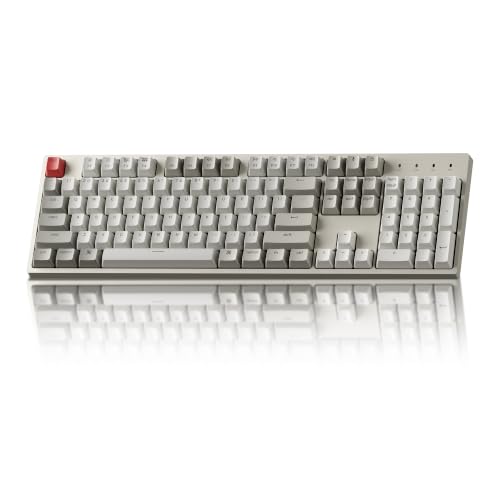
Keychron C2 Full Size Wired Mechanical Keyboard
- Retro color keycaps
- Adjustable feet
- Mac and Windows support
- Dedicated Siri or Cortana key
Keychron's C2 is a full-size wired board with a retro color scheme and a non-backlight design. The 104-key layout includes the number pad, and the inclined bottom frame with 2-level adjustable feet helps the typing angle feel more comfortable at a desk. USB-C wiring keeps the connection direct.
The pre-installed tactile Keychron switch is rated for up to 50 million keystrokes, and the board is made for Mac and Windows. It also includes extra keycaps for both systems, plus all necessary multimedia and function keys, which suits someone who prefers a classic wired setup.
How to Choose Quiet Mechanical Keyboards
Switch Feel Matters
Start with the switch style, because that shapes how the board sounds and feels under your fingers. Quiet boards often use linear or tactile options that aim to cut down on sharp noise.
Also pay attention to whether the board is described as low-profile or standard height. A lower profile can feel less tiring for some setups, while a taller one may suit users who want a more traditional mechanical feel.
Layout and Size
Layout affects both desk space and daily comfort. Compact boards leave more room for a mouse, while full-size models keep the number pad and extra function keys close. If your work involves spreadsheets or shortcuts, a larger layout can save time.
Think about whether you need a knob, display, or extra media controls too. These additions can reduce menu diving and make volume or lighting changes easier. A simple layout can feel cleaner, but a more feature-heavy board may suit a busier desk better.
Connection and Compatibility
Check how the keyboard connects before you buy. Wired USB keeps things simple, while Bluetooth and 2.4GHz wireless add flexibility if you switch between devices. Some boards support multiple operating systems, but that does not always mean every shortcut works the same way on each one.
Look at the number of devices the board can pair with and whether switching is done by a key combo, button, or receiver. If you work across a laptop, desktop, and tablet, easier switching matters. For a fixed desk, a single dependable connection may be all you need.
More to Consider for Quiet Mechanical Keyboards
Keycap Surface
PBT keycaps and ABS keycaps can feel different in daily use. PBT often comes up in quieter mechanical boards for its wear resistance and textured feel, while ABS can offer a smoother surface and sometimes sharper legends. If hand feel matters to you, check the cap material alongside the switch type and layout before deciding.
Lighting Control
Backlighting is useful, but control matters just as much. Some boards offer preset effects, while others let you change speed, brightness, or color through software, shortcuts, or a knob. If you work in mixed lighting, adjustable illumination can make a board easier to live with than a fixed glow.
Extra Input Tools
Function keys, media shortcuts, and programmable layers can change how useful a board feels day to day. If you often adjust volume, launch apps, or repeat tasks, those tools can save time. If you prefer a cleaner surface, fewer extras may be better. The right balance depends on how much control you want at your fingertips.
Frequently Asked Questions
What should you look for first in a quiet board?
Start with the switch type and the way the board is built. SOLAKAKA uses silent switches with five noise-reducing layers, while ProtoArc and Logitech use quiet linear or tactile switches.
Which pick is best if you move between devices often?
SOLAKAKA supports BT5.0, 2.4G, and Type-C, and it works with Windows, macOS, PC, laptop, and smartphone.
Which boards include a knob or display?
SOLAKAKA includes a control knob for volume, media, and lighting brightness.
Which options are better for a full-size desk setup?
ProtoArc, Logitech, SteelSeries, X9 Performance, and Keychron all keep a full-size layout, so each leaves room for a number pad and standard navigation keys.
Which ones give the most room for customization?
SOLAKAKA offers hot-swappable keys, programmable software, and RGB control. AULA also supports hot-swapping, macro programming, and lighting changes, while Redragon adds macro editing and adjustable backlight effects.
Final Verdict
SOLAKAKA's KI99 Pro earns the top spot with silent switches, five noise-reducing layers, and a gasket structure that all point toward quieter typing. The compact 96% layout, hot-swappable support, PBT keycaps, and triple-mode connection make it especially flexible for mixed work and gaming setups.
ProtoArc works well if you want quiet typing across multiple devices, and Logitech suits users who want smart lighting and broad device pairing.