10 Best Displayport Cables in 2026
Disclosure: As an Amazon Associate we earn from qualifying purchases.
Silkland is the pick for high-refresh gaming setups that need wide bandwidth, strong HDR support, and backward compatibility.
Choosing displayport cables gets tricky when your screen, graphics card, and refresh rate do not all match up. A cable that looks similar on the outside can still differ a lot in bandwidth, length, and support for newer features you may want.
These picks suit different setups, from long desk runs to gaming rigs and multi-monitor layouts.
Top Picks
Top 10 Displayport Cables Review
Pros and cons are taken from each product's listing details.
Silkland 80Gbps DisplayPort Cable 2.1

- 80Gbps bandwidth
- VESA certified DP80
- Backward compatible with DP 2.0 and DP 1.4
- Triple shielding
- Nylon exterior
Silkland is a strong pick for people building a high-refresh gaming setup with newer gear. It pairs 6.6 ft length with 80Gbps bandwidth, VESA-certified DP80 support, and compatibility with DP 2.0 and DP 1.4. The cable is described with copper and nylon construction, plus 24K gold-plated connectors and triple shielding for steadier signal delivery.
It also stands out for users who want one cable that can keep pace as their setup changes. The listing says it works with DisplayPort 1.4 devices now and is ready for DisplayPort 2.1 UHBR20 later. That makes it a sensible choice if you want a cable built around newer gaming features, strong audio pass-through, and a rugged braided finish.
UGREEN 16K 6.6FT [VESA Certified] DisplayPort Cable
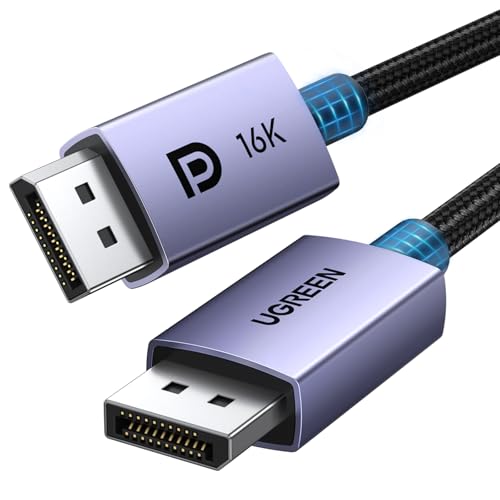
- VESA certified 54Gbps cable
- Backward compatible with DP 1.4 and DP 1.2
- Supports FreeSync and G-Sync
- Triple shielding
- Nylon braided jacket
UGREEN is aimed at people who want broad device support and a braided cord. The listing highlights 6.6 ft length, aluminum, copper, and nylon construction, plus VESA-certified 54Gbps bandwidth. It also notes backward compatibility with older DisplayPort standards, which helps if your setup mixes newer and older hardware.
This cable is a good fit for gaming displays and graphics cards that rely on adaptive-sync features. UGREEN says it supports FreeSync, G-Sync, HDR, and multi-monitor use through MST. The no-buckle design and aluminum alloy housing add extra appeal if you want a cable that looks sturdy and is built for regular plugging and unplugging.
IVANKY VESA Certified 8K DisplayPort Cable 1.4

- VESA certified 1.4 cable
- 32.4Gbps bandwidth
- Supports 8K@60Hz and 4K@240Hz
- Over 28,000 bends
- Latch-free design
IVANKY is a fit for buyers who want a certified 1.4 cable with a slimmer, flexible build. The listing gives two length figures, 6.6 ft and 6 ft, and describes copper and nylon materials. It also lists 32.4Gbps bandwidth, support for 8K@60Hz, and a latch-free design that is meant to avoid damage when disconnecting.
This one makes sense for a desktop or monitor upgrade where you want high refresh support without moving to the newest cable class. IVANKY also says the braided jacket withstands over 28,000 bends, and the gold-plated connectors are meant to support stable signal transmission. That gives it a nice balance of flexibility and durability.
Highwings 80Gbps Displayport Cable 2.1 6.6FT

- 80Gbps bandwidth
- 16K@60Hz support
- Triple-layer shielding
- Double nylon braiding
- Supports Adaptive-Sync
Highwings is for people who want a cable centered on bandwidth and gaming features. It lists 6.6 ft length, copper and nylon construction, and 80Gbps transmission. The cable is described as supporting 16K@60Hz, 8K@120Hz, and 4K@240Hz, along with triple-layer shielding and gold-plated connectors for steadier signal handling.
The listing also suits users who care about gaming motion and multi-screen setups. Highwings says it supports FreeSync, G-Sync, Adaptive-Sync, and MTS, with dynamic HDR and 32-bit audio. If you want a cable with a bold feature set and a braided exterior, this one stands out clearly.
[VESA Certified] Cable Matters 80Gbps DisplayPort 2.1 Cable

- DP80 certified
- 80Gbps data transmission
- Backward compatible with DP 2.0 and DP 1.2
- Gold-plated connectors
- Locking latch
Cable Matters is aimed at shoppers who want a certified DP80 cable with a secure connection. The listing shows 6.6 ft length and describes 80Gbps data transmission, VESA certification, and backward compatibility with DisplayPort 2.0, 1.4, and 1.2. It also includes gold-plated connectors and a locking latch.
This is a fit for a gaming monitor or PC that can take advantage of higher refresh rates and newer DisplayPort features. Cable Matters also says it supports FreeSync, G-Sync, Dolby Vision HDR, and surround sound audio. If you want a straightforward DP 2.1 cable with a latch, this one is easy to place.
Capshi 8K 4K DisplayPort Cable 1.4

- 10 ft length
- VESA certified DP 1.4
- 32.4Gbps bandwidth
- Braided build
- Supports 8K@60Hz
Capshi is a strong option when you need a longer cable for a desktop-to-monitor run. It lists a 10 ft size and copper construction, and it is described as a VESA-certified DP 1.4 cable with 32.4Gbps bandwidth. The listing also includes braided construction and support for 8K@60Hz.
It fits users who want a simple, high-speed cable with common gaming features and broad compatibility. Capshi says it supports HDCP 2.2, FreeSync, G-Sync, DSC, and multiple DisplayPort modes. If your setup needs extra reach without jumping to the newest cable class, this one deserves attention.
Amazon Basics DisplayPort 1.4 Cable

- 8K@60Hz support
- 32.4Gbps bandwidth
- Gold-plated connectors
- Foil braid shielding
- Backwards compatible with older standards
Amazon Basics is a pick for a shorter desktop setup. The listing gives a 6 ft cable with 32.4Gbps bandwidth and support for up to 8K@60Hz. It also mentions gold-plated connectors, foil braid shielding, and backward compatibility with older DisplayPort standards.
This cable suits users who want a simple connection for laptops and monitors, plus multi-monitor support. Amazon Basics also lists Dynamic HDR, 3D, and uncompressed digital audio in 7.1, 5.1, or 2 channel formats. That makes it a plain, no-frills option for standard desk use.
Acer 8K DisplayPort Cable 10FT
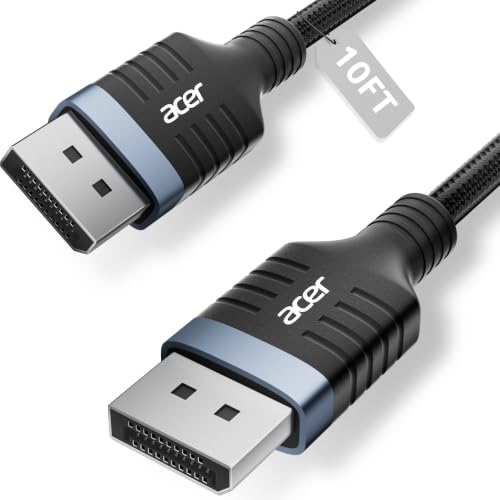
- 10 ft length
- Dynamic HDR
- MST support
- Reinforced aluminum shell
- Braided jacket
Acer is a good pick if you want a 10 ft cable for a workstation with more room to route it cleanly. The listing includes aluminum and nylon construction, plus support for 8K@60Hz, 5K@240Hz, and 4K@144Hz. It also notes Dynamic HDR, HDCP 2.2, and a reinforced aluminum shell.
This one fits buyers who want MST-ready daisy-chaining for multiple screens. Acer says the cable supports extended and mirrored modes, along with broad compatibility for common monitors and graphics cards. If your desk setup needs a longer cord and multi-screen support, this is an easy one to consider.
Stouchi 2 Packs 6.6FT VESA Certified DisplayPort 2.1 Cable 80Gbps DP Cord

- DP80 UHBR20 certification
- 80Gbps bandwidth
- Snag-free connector
- 10,000+ bends
- Dynamic HDR
Stouchi is built for users who want certified high bandwidth and a secure fit. The listing shows 6.6 ft length, aluminum, copper, and nylon materials, plus 80Gbps UHBR20 support. It also highlights a snag-free connector and a reinforced strain relief, which should appeal to tighter desk or case layouts.
This cable is also positioned for demanding gaming and creator setups. Stouchi says it supports 4K@360Hz, 8K@240Hz, 16K@60Hz, Dynamic HDR, G-Sync, and FreeSync Premium Pro. If you want a premium-feeling cable with certification and strong resistance to bending, it fits that brief well.
UVOOI 8K DisplayPort Cable 12FT
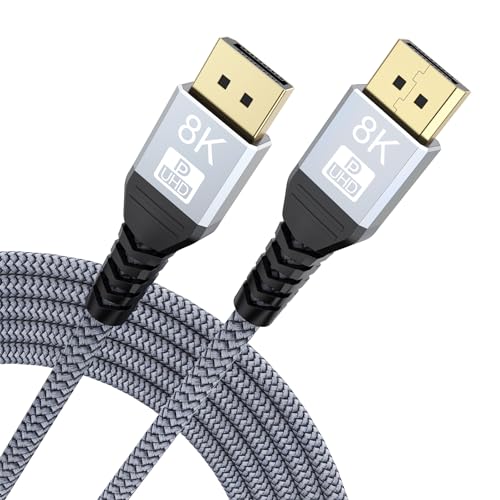
- Long-length options
- 32.4Gbps bandwidth
- CL3 rated
- Triple shielded
- Gold-plated ports
- Length options only
UVOOI is aimed at buyers who need a cable for longer runs and fixed installations. The listing gives 12 ft, 10 ft, and 15 ft options, with aluminum, copper, and nylon construction. It also notes 32.4Gbps bandwidth, CL3 rating, and triple shielding for a more installation-friendly setup.
This is the most length-focused option here, which makes it useful when a standard desk cable will not reach. UVOOI also lists HDR, HDCP 2.2, FreeSync, G-Sync, and gold-plated ports. If you need a longer cord for a wall run or a room with more distance between devices, it fits that role.
How to Choose DisplayPort Cables
Match bandwidth to your display
Start with the refresh rate and resolution your monitor or TV actually uses. A cable that supports higher bandwidth is more likely to fit demanding setups, especially if you want 4K at high refresh or even higher resolutions.
If your hardware is older, backward compatibility matters more than chasing the newest standard. A cable that works with earlier DisplayPort versions can still serve a new screen later. That makes it easier to buy once and keep using the same cable through future upgrades.
Think about connector design
Some cables use a latch, while others use a latch-free or snag-free design. That choice affects how securely the cable sits and how easy it is to unplug. If your case is tight or you change connections often, the connector style can matter as much as the picture quality support.
Cable shape also plays a role. Braided jackets, reinforced shells, and strain relief can help a cable hold up better in daily use. For a desk with frequent movement or cable bends, a sturdier exterior is worth prioritizing.
Choose the right length
Length affects both convenience and tidiness. A cable that is too short can limit where you place your devices, while one that is much longer than needed can create clutter. Measure the real route from port to port, including any turns behind a desk or through a wall path.
Longer runs are especially useful for wall-mounted screens, home theater setups, or desks with towers on the floor. Shorter cables often work better for clean desk layouts and simpler connections. The right choice is the one that fits your room without stretching or leaving excess slack.
More to Consider for Displayport Cables
Signal handling
Look for details that point to stable transmission, such as shielding, gold-plated connectors, or copper conductors. These features are especially useful when you are connecting powerful graphics cards or high-refresh displays. A cable built to reduce interference can help keep the setup steady when the system is pushing a lot of data.
Setup flexibility
Consider whether the cable supports multi-monitor use, mirrored modes, or expanded workspaces. If you plan to add screens later, a cable with those options can save you from replacing it sooner. Support for different modes can also make a single cable more useful across a desktop, workstation, or gaming room.
Installation needs
For a permanent or semi-permanent run, check whether the cable is suited to the route you plan to use. Wall paths, longer desk spans, and tight case openings all change what feels easy to manage. A cable with the right jacket and length can make installation cleaner and reduce strain on the ports.
Frequently Asked Questions
How do I choose the right cable length?
Pick the length that matches the real path between your devices, not just the straight-line distance.
Which one is better for very high refresh gaming?
Silkland lists 80Gbps bandwidth, support for 8K@240Hz and 4K@540Hz with DSC, and gaming-focused features like VRR and ALLM. Highwings also lists 80Gbps bandwidth and support for 8K@120Hz and 4K@240Hz, while Stouchi lists 80Gbps UHBR20 with 4K@360Hz and 8K@240Hz. Those three are the most aggressive options here for fast-motion setups.
Which picks have the strongest connector security?
Cable Matters includes a locking latch, which is the clearest secure-connection detail in the list.
Which options mention multi-monitor support?
Silkland lists MST technology for multi-monitor setups. UGREEN also lists Multi-Stream Transport, while Acer says it supports MST-ready daisy-chaining in extended and mirrored modes.
Which cable is best for a wall run or longer room setup?
UVOOI is the clearest choice for longer room layouts because it comes in 12 ft, 10 ft, and 15 ft options, and it is CL3 rated for installation use. Capshi and Acer both offer 10 ft lengths if you need extra reach without going as long. The shorter 6 ft and 6.6 ft options suit closer desk connections instead.
Final Verdict
Silkland is the top pick because it combines 80Gbps bandwidth, VESA-certified DP80 support, copper and nylon construction, and backward compatibility with DP 2.0 and DP 1.4. It is the strongest fit for high-refresh gaming setups that also need room to grow into newer hardware.