10 Best Dual Monitor Arms in 2026
Disclosure: As an Amazon Associate we earn from qualifying purchases.
HUANUO is the pick for users who want a sturdy, highly adjustable setup for 13 to 32 inch screens.
Choosing a desk mount gets tricky when your screens, desk thickness, and mounting pattern all need to line up. With dual monitor arms, small fit details can matter just as much as motion range or clamp style.
These picks suit different screen sizes, desk setups, and positioning needs. Some focus on compact compatibility, while others allow taller reach or heavier displays.
Top Picks
Top 10 Dual Monitor Arms Review
Pros and cons are taken from each product's listing details.
HUANUO FlowLift™ Dual Monitor Stand

- Wide screen fit
- Dual mounting options
- Full-motion adjustment
- Cable management
- Desk space saver
- Plastic or glass desks cannot be used
- The bottom of the desk should not have cross beams or panels
HUANUO’s FlowLift dual monitor stand fits 13 to 32 inch screens that weigh 4.4 to 19.8 lbs and use 75×75 or 100×100 VESA holes. It also gives you C-clamp and grommet mounting choices, with desk thickness listed at 0.59 to 3.54 inches. That makes it a strong fit for many home or gaming desks that already meet the size limits.
The arm movement is broad, with +85°/-50° tilt, ±90° swivel, and 360° rotation. HUANUO also says the screens can rise up to 15.75 inches, and the built-in cable guides help keep the desktop open. It suits people who want easy positioning and a tidier workspace, but it needs the right desk construction before purchase.
ErGear Dual Monitor Arm

- Tool-free VESA mount
- Wide motion range
- Cable clips included
- Two mounting methods
- Long-term stability focus
- The clamp and grommet ranges differ
ErGear is built for 13 to 32 inch monitors and supports 4.84 to 19.8 lbs with 75×75 or 100×100 VESA patterns. Its tool-free VESA plate is the standout detail, and the stand can mount with either a one-piece C-clamp or an optional bolt-through grommet base. It suits buyers who want a simpler setup process on a wooden desk.
The arm reaches up to 18.1 inches and offers up to 17.5 inches of height adjustment, plus +80°/-50° tilt, ±90° swivel, and 360° rotation. ErGear also includes easy-opening cable clips and a tighter-fitting VESA panel for stability. It works well if you want flexible positioning without giving up quick assembly.
VIVO AeroPoise™ Dual Monitor Stand
- Mechanical spring adjustment
- Open-top VESA plates
- Strong motion range
- Easy slide-on installation
- The back of the arms will extend past the edge of your desk
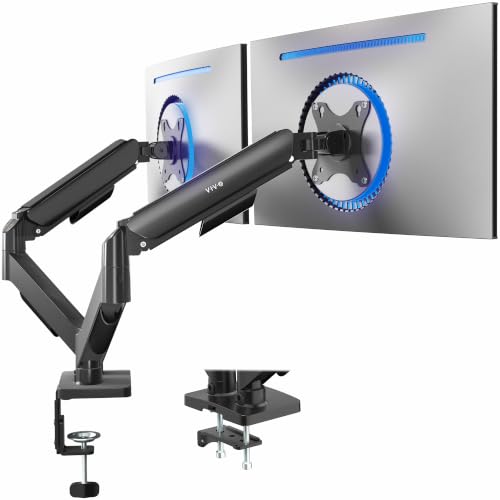
VIVO’s AeroPoise mount fits 17 to 32 inch flat and curved screens weighing 4.4 to 19.8 lbs each. Its mechanical spring adjustment is meant for toolless positioning, and the open-top VESA plates make slide-on installation straightforward. The stand also uses a heavy-duty C-clamp or an optional bolt-through grommet mount, so it suits desks that can accept either style.
For viewing control, VIVO lists +90° to -90° tilt, 180° swivel, and 360° rotation. The arm is also described as helping clear desk space by raising two screens. Choose it if you want spring-balanced movement and a broad fit range, but note the arms extend past the desk edge.
BenQ ErgoArm BDH01 Dual Monitor Arm for 2 Screens Up to 35'' & 44lbs

- Supports large screens
- Gas spring height adjustment
- Reinforcement plate included
- Top mounting options
BenQ’s ErgoArm BDH01 is built for two screens up to 35 inches and 44 lbs each. It uses gas spring technology for smooth height changes, and the reinforcement plate is meant to help protect the desktop during installation. The arm suits larger or heavier displays that need a sturdier mount than compact models usually offer.
BenQ also lists full-range movement for changing viewing height and angle, plus clamp and grommet top mounting. Its desk fit is shown as 12 to 45 mm thick. This is a solid choice when screen size and load capacity matter more than a smaller footprint.
Acer Dual Monitor Arm

- Broad screen compatibility
- Gas spring support
- Multiple layout options
- Hidden cable clips
- Not suitable for glass or plastic surface
Acer’s dual monitor arm supports 17 to 32 inch screens weighing 4.4 to 19.8 lbs, with 75×75 and 100×100 VESA compatibility. It includes C-clamp and grommet mounting, and the desk thickness range is 0.59 to 3.15 inches. That makes it a good fit for buyers who want a wide adjustment range on a compatible wood desk.
The arm offers 18.1 inches of height adjustment and 21.25 inches of extension, along with 360° rotation, +90°/-60° tilt, and ±90° swivel. Acer also lists multiple layout options, including horizontal and vertical combinations. It suits people who want a flexible workstation, as long as the surface is not glass or plastic.
MOUNTUP Dual Monitor Stand for Desk

- Cable management
- Pneumatic arms
- Clean desk setup
- Flexible positioning
MOUNTUP fits flat and curved 17 to 32 inch monitors that weigh 4.4 to 17.6 lbs and use 75×75 or 100×100 VESA patterns. It comes with both C-clamp and grommet mounting, and the clamp works with desks 0.39 to 2.76 inches thick. The arm suits people who want a mount with a lighter load limit than some others here.
Its pneumatic arms offer 17.3 inches of extension and 17.3 inches of height adjustment, plus 135° tilt, 180° swivel, and 360° rotation. MOUNTUP also uses cable management to hide wires along the arms. Choose it if you want a tidy desk and broad motion without a complicated setup.
WALI Adjustable Dual Monitor Arm for 13-32 inch Screens

- Higher load capacity
- Wide motion range
- Wood desk fit
- 20,000+ cycle durability
- Clamp and grommet ranges are the same
WALI supports flat or curved 13 to 32 inch screens, with a max load of 22 lbs per arm and 75×75 or 100×100 VESA mounting. It includes both C-clamp and grommet mounting, and the desk range is 0.39 to 2.76 inches thick. This one suits buyers who want a higher per-arm load limit than many compact stands provide.
The arm extends 19.3 inches and rises 17.3 inches above the desktop, with +90°/-90° swivel, +70°/-45° tilt, and 360° rotation. WALI also lists a wider VESA head, tighter-fitting VESA panel, and 20,000+ cycles for durability. It is a strong pick for a clean, adjustable desktop on a wooden surface.
Amazon Basics Gas Spring Dual Monitor Arm Desk Mount

- Gas spring system
- Independent tension adjustment
- Complete mounting kit
Amazon Basics fits 15 to 27 inch monitors and supports up to 15.4 lbs on each arm. It uses 75×75 and 100×100 VESA patterns, and the mounting kit includes both a C-clamp and a grommet option for desks 0.39 to 4 inches thick. That makes it suitable for smaller screens or lighter monitors.
Each arm has independent tension adjustment, and the gas spring system is meant for stable positioning once it is set to the monitor’s weight. The joints may arrive pre-tightened, so the adjustment process matters. This is the pick for lighter setups where you want a simple dual-arm layout with broad desk thickness support.
EVEO Premium Dual Monitor Mount 14"-32” Dual Monitor Arm VESA Bracket

- Five-minute installation
- Two mount options
- 360° rotation
- Space-saving design
- Clamp and grommet ranges differ
EVEO fits 14 to 32 inch screens with 75×75 and 100×100 VESA patterns. It is described as a quick-install mount with a desk clamp or a grommet base, so it suits people who want a fast setup and a cleaner desktop. The arm also helps open up more surface space by lifting both monitors off the desk.
For motion, EVEO offers 360° rotation and +90° to -90° swivel. The mount is also presented as a sturdy option for home or office workstations. It works well if you want a dual-monitor arm with simple installation, though the mounting ranges are not identical.
ARES WING Dual Monitor Arm Desk Mount for 17-49 Inch Monitors Holds 44 lbs

- Supports ultrawide screens
- Vertical stacking options
- Aluminum build
- Quick-release VESA panels
- Requires a VESA adapter if the monitor has no VESA holes
ARES WING is made for 17 to 49 inch monitors and supports up to 44 lbs per arm. It uses 75×75 and 100×100 VESA patterns, and its aluminum build is paired with a gas spring that has been through 20,000+ fatigue testing cycles. That makes it a strong fit for larger displays and heavier setups.
The arm reaches 22.4 inches and rises to 27.9 inches, with +50° to -20° tilt, ±90° swivel, and 360° rotation. ARES WING also offers stacking options and quick-release VESA panels for easier installation. Choose it if you want a tall, flexible mount for very large screens and have the right VESA setup.
How to Choose Dual Monitor Arms
Check Screen Fit
Start with the size, weight, and VESA pattern of each monitor. A mount that matches one screen but misses the other can create an awkward setup right away. Look for a range that covers both displays at the same time, not just one of them.
Also think about how the screens will sit on the desk. Some arms work best with lighter displays, while others are built for larger panels or wider spacing.
Match the Desk
The desk matters as much as the monitors. Check thickness, surface material, and what is under the desktop before you buy. A clamp may work on one table and fail on another if there is a crossbeam or lip in the wrong place.
Mounting style also changes how stable the setup feels. Some people prefer a clamp for easier removal, while others want a grommet base for a more fixed fit. Either way, the desk has to be able to support the arm without slipping, flexing, or blocking the hardware.
Choose the Right Motion
Think about how you use your screens each day. If you switch between typing, reading, and calls, look for tilt, swivel, rotation, and height range that let you move the displays smoothly. Good motion helps you set both monitors at the same line of sight without constant readjustment.
It also helps to consider extension. A longer reach gives you more freedom to place the screens where they feel comfortable, especially on deeper desks or with stacked layouts. If you share your workstation with other gear, cable routing can matter too, because it keeps cords from fighting for space.
More to Consider for Dual Monitor Arms
Desk Layout
Think about what else sits on the desktop. A setup with a keyboard, notebook, and dock may need a different arm reach than a bare work surface. Clearance under the desk matters too, especially if drawers, braces, or leg room could interfere with the mounting hardware or arm swing.
Cable Path
A clean setup is not only about lifting screens. The way cords run from the monitors to the computer can affect how tidy and easy to use the station feels. Built-in routing helps, but it still pays to check whether power, video, and accessory cables will move freely as the arms shift.
Long-Term Use
If you move your monitors often, pay attention to how the joints are designed to hold position over time. Smoother movement can be useful, but only if the arm stays where you set it. A strong frame, solid tension control, and a secure attachment all matter for daily use.
Frequently Asked Questions
How do I know if my monitors will fit?
Check screen size, weight, and VESA pattern for each monitor before buying.
What desk details matter most?
Thickness and surface type matter first, because several mounts only work within specific desk ranges.
Which option works best for heavier screens?
BenQ lists support up to 44 lbs per arm, and ARES WING also lists 44 lbs per arm, so those are the strongest choices for larger displays.
Which model gives the most reach and movement?
Acer lists 21.25 inches of extension and 18.1 inches of height adjustment, while ARES WING lists 22.4 inches of extension and 27.9 inches of height.
Which arm is easiest to set up?
ErGear stands out for tool-free VESA mounting, and EVEO says installation can be done in 5 minutes.
Final Verdict
HUANUO stands out because it covers 13 to 32 inch screens, 4.4 to 19.8 lbs per arm, 75×75 or 100×100 VESA, and both clamp and grommet mounting. Its +85°/-50° tilt, ±90° swivel, 360° rotation, and built-in cable guidance make it the most balanced all-around listing here for a wide range of setups.
ErGear suits people who want tool-free VESA mounting and a lighter load minimum, while VIVO is a good fit for spring-balanced motion and 17 to 32 inch screens. BenQ is the match for very large, heavy displays.