

Have you ever stared at your screen for hours, struggling to read tiny code or feeling eye strain after just a short time? It’s frustrating when your monitor doesn’t support your programming needs.
The wrong screen can make work harder, slow you down, and even cause headaches. But choosing the right monitor changes everything. A good programming monitor gives you clear, sharp text and reduces eye fatigue. It helps you stay focused and comfortable all day long.
Whether you need more screen space, better color accuracy, or special features for coding, the right monitor can make your daily work easier and more enjoyable. In this article, we’ll explore some of the best monitors designed specifically for programming. Keep reading to find the perfect screen that fits your needs and boosts your productivity.
Benq Rd280u Programming Monitor

The BenQ RD280U 28.2” 4K Programming Monitor is ideal for software developers, programmers, and IT professionals who require high-resolution displays with precise color accuracy and eye-care features for extended coding sessions. This monitor is perfect for users who value productivity-enhancing features such as multiple coding modes, USB-C connectivity, and ergonomic designs that reduce eye strain during long hours of work.
Pros:
- Ultra-high 4K resolution (3840×2560) with a 3:2 aspect ratio, providing more vertical screen space for code and documents.
- Eye-care technology including flicker-free and low blue light modes to minimize eye fatigue.
- MoonHalo backlight system offers comfortable ambient lighting to reduce eye strain in dark environments.
- Nano matte panel reduces reflections and glare for clearer visuals.
- 90W USB-C port allows fast charging and seamless data transfer with a single cable.
- KVM switch support enables controlling multiple computers with one keyboard and mouse setup.
- VESA mount compatibility for flexible installation and ergonomic positioning.
Cons:
- Relatively heavy weight (16.8 pounds) may require a sturdy desk or mount.
- Premium features come at a higher price point compared to standard monitors.
- 28.2-inch size might be large for users with limited desk space.
The BenQ RD280U features a stunning 4K resolution combined with a unique 3:2 aspect ratio that offers more vertical workspace, making it easier for developers to view long lines of code or multiple documents without excessive scrolling. Its nano matte panel ensures minimal glare, which enhances clarity and reduces distractions during detailed tasks. The inclusion of coding modes optimizes color settings specifically for programming environments, improving text readability and reducing eye strain.
Additionally, the monitor is equipped with advanced eye-care technologies such as flicker-free screens and low blue light filters, which protect users’ eyes during extended periods of use. The innovative MoonHalo backlight provides subtle ambient lighting behind the monitor, helping to reduce contrast-related eye fatigue in dimly lit rooms. With its powerful 90W USB-C port, users can conveniently connect and power laptops or other devices with a single cable, while the KVM switch allows seamless control over multiple computers, boosting workflow efficiency for developers working across different systems. Overall, the BenQ RD280U is a thoughtfully designed developer monitor that balances productivity, comfort, and connectivity.
To buy this product, click here.
Benq Rd240q Programming Monitor

The BenQ RD240Q 24.1” WQXGA Programming Monitor is ideal for professional programmers, developers, and tech enthusiasts who require a high-resolution display with specialized features to enhance coding efficiency and comfort. If you spend long hours in front of the screen and value eye-care technology combined with ergonomic design, this monitor is tailored to meet your needs.
Pros:
- 90W USB Type-C connectivity for fast charging and data transfer
- Advanced Coding Modes and Coding HotKey for optimized programming experience
- Ergonomic Design to reduce strain during extended use
- 16:10 Special Ratio provides extra vertical screen space for better code visibility
- Circadian Mode and Eye-Care Technology reduce eye fatigue and promote healthy viewing habits
- Eco-Friendly Design minimizes environmental impact
Cons:
- Heavier weight at 10.4 pounds may limit portability
- Metal Grey color might not suit all aesthetic preferences
- Limited to 24.1-inch screen size, which may be small for some multitasking users
The BenQ RD240Q features a stunning WQXGA resolution which ensures crystal-clear visuals and sharp text rendering, essential for coding and reading complex scripts. The inclusion of Advanced Coding Modes and a dedicated Coding HotKey allows users to switch between display settings optimized for different programming languages and environments, boosting productivity. Additionally, the 16:10 special ratio offers more vertical screen real estate compared to standard 16:9 monitors, making it easier to view more lines of code at once.
Beyond performance, this monitor is designed with user comfort in mind. The ergonomic design allows for height, tilt, and swivel adjustments, reducing physical strain during long coding sessions. The Circadian Mode and Eye-Care Technology help reduce blue light exposure and flickering, promoting eye health and reducing fatigue. Furthermore, the 90W USB Type-C port simplifies connectivity by allowing power, video, and data transfer through a single cable, enhancing workspace tidiness. Overall, the BenQ RD240Q is a versatile and user-friendly monitor tailored for programmers who value both functionality and comfort.
To buy this product, click here.
Lg 34g600a-b 34-inch Ultragear Curved Gaming Monitor

The LG 34G600A-B 34-inch Ultragear Curved Gaming Monitor is perfect for avid gamers and creative professionals who demand high performance and immersive visuals. If you seek a wide, ultrawide WQHD (3440 x 1440) display with a fast refresh rate and adaptive sync technology, this monitor is designed to elevate your gaming and multitasking experience. It suits users who appreciate vibrant colors, smooth gameplay, and ergonomic adjustability.
Pros:
- 160Hz refresh rate ensures ultra-smooth motion for competitive gaming
- AMD FreeSync Premium eliminates screen tearing and stuttering
- Curved WQHD display offers immersive, detailed visuals with expansive screen space
- HDR10 support enhances color and contrast for more lifelike images
- Ergonomic tilt, height, and swivel stand for customizable comfort
- HDMI 2.1 and DisplayPort connectivity for versatile device compatibility
- Built-in speakers provide convenient audio without extra peripherals
- Reader Mode reduces eye strain during extended use
Cons:
- Heavier weight at 22 pounds may require a sturdy desk or mount
- No USB-C port for direct laptop connectivity
- Lacks advanced HDR features compared to premium HDR monitors
The LG 34G600A-B Ultragear Monitor boasts a stunning 34-inch curved ultrawide screen with a crisp WQHD resolution of 3440 x 1440. This expansive display provides ample workspace, making it ideal for gamers who want to immerse themselves in vast game worlds and professionals who benefit from multitasking across multiple windows. The curvature enhances depth perception and reduces distortion, resulting in a more natural viewing experience.
Featuring a blazing 160Hz refresh rate combined with AMD FreeSync Premium, this monitor delivers buttery-smooth gameplay with minimal input lag and no screen tearing. The inclusion of HDR10 support further enriches the visual quality by enhancing brightness and color accuracy, which is great for watching HDR content or gaming with vivid scenes. Additionally, the flexible stand allows users to adjust the height, tilt, and swivel for ergonomic comfort during long sessions, while the Reader Mode helps reduce eye fatigue when reading or working for extended periods.
To buy this product, click here.
Benq Rd280ua

The BenQ RD280UA 28.2” 4K Programming Monitor is ideal for professional developers, coders, and tech enthusiasts who require exceptional screen clarity and ergonomic flexibility. If you spend long hours programming or working on detailed projects, this monitor’s advanced features such as Eye-Care Technology and Night Hours Protection make it a perfect choice to reduce eye strain while maintaining productivity. Its high resolution and specialized coding modes cater specifically to users who need precision and comfort.
Pros:
- Ultra-high 4K 3840×2560 resolution for crisp and clear visuals
- Ergo Flexible Arm for customizable viewing angles and ergonomic comfort
- 90W USB-C connectivity supporting fast data transfer and power delivery
- Fine-Coated Panel reduces glare and reflections
- Specialized Advanced Coding Modes tailored to developers’ needs
- Night Hours Protection to minimize blue light and eye fatigue during late work sessions
- Coding HotKey for quick access to programming-friendly display settings
- Eye-Care Technology enhances viewing comfort over extended periods
Cons:
- Relatively large footprint may require ample desk space
- Heavier weight at 16.8 pounds makes it less portable
- Premium features come with a higher price point
The BenQ RD280UA monitor’s standout feature is its impressive 4K resolution, which provides an expansive workspace with crystal-clear detail essential for coding and debugging. Its fine-coated panel effectively reduces glare, making it easier to work for long periods without discomfort. The integration of a 90W USB-C port enables seamless connectivity with modern laptops and devices, reducing cable clutter and enhancing desk organization. The Ergo Flexible Arm allows users to adjust the monitor height, tilt, and swivel to their preferred ergonomic position, which is crucial for maintaining good posture during extended coding sessions.
Additionally, the monitor is designed with programmers in mind, featuring Advanced Coding Modes that optimize text clarity and contrast for easier code reading. The Coding HotKey offers quick toggling between these modes, saving time and improving workflow. The inclusion of Night Hours Protection and Eye-Care Technology helps to reduce blue light exposure and eye fatigue, making late-night work less taxing. Overall, this monitor combines high-end visual performance with thoughtful ergonomic and health-conscious features, making it an excellent investment for serious programmers and tech professionals.
To buy this product, click here.
Asus 24” Eye Care Monitor Va249hg

The ASUS 24” (23.8-inch viewable) 1080P VA249HG Eye Care Monitor is ideal for users seeking a high-quality, affordable display that balances performance and eye comfort. This monitor is perfect for gamers, professionals, and everyday users who want a crisp Full HD resolution, smooth visuals with a 120Hz refresh rate, and advanced eye care technologies like Low Blue Light and Flicker Free features to reduce eye strain during long hours of use.
Pros:
- IPS panel offering vibrant colors and wide viewing angles
- Full HD 1080P resolution for clear and sharp visuals
- 120Hz refresh rate with Adaptive-Sync for smooth gaming experience
- 1ms response time reducing motion blur
- 99% sRGB color coverage ensuring accurate color reproduction
- Eye Care technologies like Low Blue Light and Flicker Free for comfortable viewing
- Frameless design for a modern look and seamless multi-monitor setup
- Wall mountable for flexible placement
- Backed by a 3-year warranty for reliability
Cons:
- No built-in speakers, requiring external audio solutions
- Limited USB connectivity options
- The 23.8-inch size might be small for users needing larger screens
The ASUS VA249HG monitor features an IPS panel that delivers vibrant and consistent colors with wide viewing angles, making it suitable for creative work and media consumption. Its Full HD 1080P resolution ensures sharp images and text clarity, enhancing productivity whether you are working, gaming, or streaming content. The 99% sRGB color gamut guarantees color accuracy, beneficial for photo editing and design tasks.
With a 120Hz refresh rate combined with Adaptive-Sync technology, this monitor minimizes screen tearing and stuttering, providing a smooth and responsive gaming experience. The 1ms response time further reduces motion blur, which is crucial for fast-paced games. Additionally, the built-in Eye Care features, including Low Blue Light and Flicker Free technology, protect your eyes from strain during extended usage sessions, making it a comfortable choice for daily use. The sleek, frameless design not only looks modern but also supports multi-monitor setups seamlessly, while the option to wall mount adds to its versatility in different environments.
To buy this product, click here.
Benq Ma320u 32” 4k Monitor

The BenQ MA320U 32” 4K Monitor is ideal for MacBook Pro and MacBook Air users who demand exceptional visual clarity and color accuracy. Creative professionals, graphic designers, and video editors who rely on precise color matching and high-resolution displays will find this monitor particularly beneficial for enhancing their workflow and productivity.
Pros:
- Stunning 4K 3840×2160 resolution for crystal-clear images and sharp details.
- Dual USB-C ports with 90W power delivery, allowing seamless connectivity and charging for MacBooks.
- Mac Color Match feature ensures accurate color representation optimized for Mac systems.
- Built-in USB hub for easy connection of peripherals.
- Convenient brightness and volume controls directly accessible on Mac.
- Height and tilt adjustable stand for ergonomic comfort during extended use.
- Supports the wide P3 color gamut for vibrant and true-to-life colors.
Cons:
- Relatively large footprint with dimensions of 28.0 inches length and 24.0 inches width, requiring ample desk space.
- Premium price point may be a consideration for budget-conscious buyers.
The BenQ MA320U features a stunning 32-inch 4K display that delivers exceptional sharpness and clarity, making it perfect for detailed design work and multimedia consumption. Its dual USB-C ports provide not only fast data transfer but also up to 90W power delivery, eliminating the need for separate chargers and reducing cable clutter. This seamless integration with MacBook Pro and MacBook Air enhances user convenience and ensures a clean, efficient workspace.
One of the standout features of this monitor is the Mac Color Match technology, which guarantees that colors are reproduced with remarkable accuracy. This is complemented by the support for the wide P3 color gamut, giving creatives the confidence that their work will look consistent across different devices and print materials. Additionally, the ergonomic height and tilt adjustable stand improves comfort during long hours of use, while the built-in USB hub and accessible brightness and volume controls optimize the overall user experience.
To buy this product, click here.
Lg 32up83ak-w 32-inch Ultrafine 4k Uhd Ips Computer Monitor
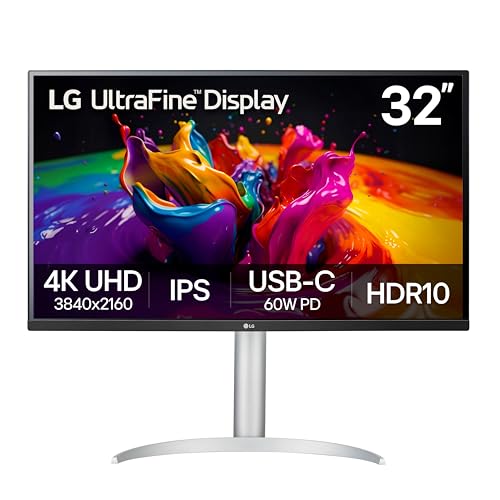
The LG 32UP83AK-W 32-inch Ultrafine 4K UHD Monitor is ideal for professionals, creatives, and tech enthusiasts seeking a high-resolution display with vibrant colors and versatile connectivity. If you require a monitor that delivers sharp image quality for tasks such as photo editing, video production, or detailed design work, this monitor is a perfect fit. Its ergonomic stand and advanced features also make it suitable for those who spend long hours in front of the screen and need comfort and eye protection.
Pros:
- 4K UHD (3840 x 2160) resolution provides crisp and detailed visuals.
- IPS panel technology ensures wide viewing angles and accurate color reproduction.
- HDR10 support enhances contrast and color depth for a more immersive experience.
- USB Type-C with 60W Power Delivery allows easy connection and charging of compatible devices.
- Adjustable stand with tilt, height, and pivot for ergonomic customization.
- Built-in speakers offer convenient audio output without extra peripherals.
- Reader Mode reduces blue light for comfortable long-term use.
Cons:
- The 60Hz refresh rate may not satisfy competitive gamers seeking higher frame rates.
- White color finish might not blend well with all workspace aesthetics.
- Heavier weight at over 18 pounds can make mounting or repositioning more challenging.
The LG 32UP83AK-W features a stunning 32-inch IPS panel delivering true-to-life colors and a sharp 4K UHD resolution, making it perfect for detailed work such as graphic design and video editing. The inclusion of HDR10 further enhances the visual experience by providing greater contrast and richer colors, ensuring that users enjoy vivid and lifelike images. The monitor’s Reader Mode helps reduce eye strain during extended sessions, which is especially beneficial for professionals who spend many hours in front of their screens.
Connectivity is another strong suit of this monitor, with options including HDMI, DisplayPort, and USB Type-C featuring 60W Power Delivery. This enables users to connect multiple devices and conveniently charge laptops or peripherals through a single cable. The ergonomic stand allows users to easily adjust the height, tilt, and pivot, promoting comfortable posture and reducing fatigue. Additionally, the built-in speakers provide a neat audio solution without the need for extra equipment, making the LG 32UP83AK-W a versatile and user-friendly option for both work and entertainment.
To buy this product, click here.
Msi Pro Mp275w E2

The msi PRO MP275W E2 27-inch IPS Gaming Office Monitor is ideal for users seeking a versatile display that balances professional office use and casual gaming. This monitor is perfect for office workers, students, and casual gamers who want a crisp Full HD (1920 x 1080) resolution with a smooth 120Hz refresh rate and 1ms response time for fluid visuals and reduced motion blur.
Pros:
- 27-inch IPS panel offers vibrant colors and wide viewing angles
- 120Hz refresh rate and 1ms response time ideal for smooth gaming performance
- Multiple connectivity options including HDMI, DisplayPort, and VGA
- Free-Sync technology reduces screen tearing and stuttering
- 4-Side Slim Bezel design enhances multi-monitor setups
- VESA mountable and adjustable tilt for ergonomic comfort
- Built-in speakers add convenience for multimedia use
- Elegant white color to fit modern office aesthetics
Cons:
- Speakers may not provide high-quality audio for audiophiles
- Limited advanced gaming features compared to dedicated gaming monitors
- Only Full HD resolution, which may not satisfy users needing 4K clarity
The msi PRO MP275W E2 combines an expansive 27-inch IPS display with a fast 120Hz refresh rate, delivering vivid images and smooth motion suited for both work and play. Its 1ms response time ensures minimal input lag, which benefits gamers looking for responsiveness without sacrificing color accuracy. The inclusion of Free-Sync technology further enhances the gaming experience by synchronizing the frame rate between the monitor and GPU to prevent screen tearing.
Designed for versatility, this monitor supports multiple input options such as HDMI, DisplayPort, and VGA, making it compatible with various devices. The 4-side slim bezel design is perfect for multi-monitor setups, providing a seamless viewing experience. Additionally, the VESA mountable feature and adjustable tilt allow users to customize their setup for ergonomic comfort. Its clean white finish adds a modern touch to any workspace, while the built-in speakers offer convenient audio without needing extra peripherals.
To buy this product, click here.
Kado Dual Monitor Setup

The Kado Dual Monitor Setup – 2-Pack 24″ Curved 1920×1080 Computer Monitor is ideal for professionals and gamers who need an immersive and efficient dual-screen experience. This setup is perfect for office workers, content creators, and gaming enthusiasts looking to enhance productivity and visual engagement with high-quality displays that support both work and entertainment.
Pros:
- Dual 24-inch curved monitors with a 1500R curvature for immersive viewing
- Full HD resolution (1920×1080) delivering clear and sharp images
- 75Hz refresh rate for smooth visuals and reduced screen tearing
- VESA mount compatibility for flexible and ergonomic placement
- Built-in speakers eliminating the need for external audio devices
- HDMI connectivity for easy setup with various devices
- Lightweight design (11.64 pounds each) for easy installation and adjustment
Cons:
- Limited to 1080p resolution, which may not satisfy users seeking 4K quality
- No advanced gaming features like G-Sync or FreeSync support
- Built-in speakers may have lower sound quality compared to dedicated audio devices
The Kado Dual Monitor Setup features two 24-inch curved displays with a 1500R curvature, which enhances the viewing angle and reduces eye strain during extended use. The Full HD resolution ensures crisp visuals, making it suitable for detailed office tasks, multimedia editing, and casual gaming. The 75Hz refresh rate provides smoother motion, improving the overall experience especially during fast-paced scenes. Additionally, the monitors are designed with VESA mount compatibility, allowing users to customize their workspace setup for optimal ergonomics and comfort.
Equipped with built-in speakers and HDMI ports, this dual monitor pack offers convenience by minimizing cable clutter and the need for extra peripherals. The lightweight design and sleek black finish add to its practicality and aesthetic appeal in any office or gaming environment. Whether you are multitasking across applications or diving into immersive gameplay, the Kado C24X Dual Series delivers a balance of performance and versatility that meets the needs of a diverse range of users.
To buy this product, click here.
Msi Pro Mp275 E2

The msi PRO MP275 E2 27-inch IPS monitor is ideal for both gamers and office professionals seeking a versatile display that combines high performance with ergonomic design. If you want a Full HD (1920 x 1080) resolution screen with a fast 120Hz refresh rate and 1ms response time for smooth visuals, this monitor is a great choice. It’s also perfect for users who need multiple connectivity options such as HDMI, DisplayPort, and VGA, along with a sleek, space-saving design featuring a 4-side slim bezel.
Pros:
- Crisp 27-inch IPS display with vibrant colors and wide viewing angles
- Smooth gameplay and reduced motion blur thanks to 120Hz refresh rate and 1ms response time
- Support for Free-Sync technology to eliminate screen tearing
- Multiple connectivity options including HDMI, DisplayPort, and VGA ports
- VESA mountable design for flexible installation
- Built-in speakers for convenient audio output
- Elegant 4-side slim bezel design enhances multi-monitor setups
Cons:
- Speakers may lack depth and richness compared to dedicated audio devices
- No built-in USB ports for peripheral connectivity
- Limited ergonomic adjustments beyond basic tilt
The msi PRO MP275 E2 features a high-quality IPS panel that delivers consistent and accurate colors with wide viewing angles, making it suitable for both gaming and professional tasks like photo editing or document work. The Full HD resolution ensures sharp images, while the 120Hz refresh rate and 1ms response time provide fluid motion and reduce ghosting, which gamers will particularly appreciate during fast-paced action sequences. Additionally, Free-Sync technology helps synchronize the monitor with compatible graphics cards to eliminate screen tearing and stuttering.
Connectivity is another strong point of this monitor, offering HDMI, DisplayPort, and VGA ports to connect a variety of devices easily. The VESA mountable design allows users to save desk space or create multi-monitor setups with ease. Its 4-side slim bezel not only provides a modern look but also minimizes distractions, enhancing immersion whether you’re working or gaming. The built-in speakers add convenience for casual audio needs, though audiophiles might prefer external sound solutions for richer sound quality.
To buy this product, click here.
Frequently Asked Questions
What Makes Benq Rd280u Ideal For Programming?
BenQ RD280U offers a 28. 2” 4K 3:2 display, perfect for coding. It includes eye-care tech, coding modes, and a USB-C port with 90W power delivery. Its ergonomic design and KVM switch enhance multitasking and comfort.
How Does Lg 34g600a-b Support Programming And Gaming?
LG 34G600A-B is a 34-inch curved WQHD monitor with a 160Hz refresh rate. It features AMD FreeSync, HDR10, and Reader Mode, making it great for programming and gaming. Its ergonomic stand offers tilt, height, and swivel adjustments.
Why Choose Benq Ma320u For Macbook Users?
BenQ MA320U is a 32” 4K monitor designed for MacBook Pro/Air. It provides dual USB-C ports, 90W power delivery, Mac color match, and P3 color gamut. The adjustable stand and USB hub improve productivity and comfort.
What Benefits Do Benq Rd240q’s Coding Modes Offer?
BenQ RD240Q has advanced coding modes tailored for programmers. These modes reduce eye strain and improve text clarity. The 24. 1” WQXGA 16:10 display offers more vertical space for coding. It also features a hotkey for quick mode switching.
Is Asus Va249hg Suitable For Programming And Eye Care?
ASUS VA249HG is a 24” Full HD IPS monitor with eye-care tech. It offers low blue light, flicker-free technology, and a fast 120Hz refresh rate. The frameless design and adaptive-sync ensure comfortable, smooth coding sessions.
How Does Msi Pro Mp275w Enhance Office And Programming Tasks?
MSI PRO MP275W is a 27-inch IPS monitor with a 120Hz refresh rate. It features FreeSync, multiple input ports, and a slim bezel design. Its ergonomic tilt and built-in speakers make it ideal for office work and programming.
Conclusion
Choosing the right monitor can make coding easier and more comfortable. The models listed offer great features like high resolution, eye-care technology, and ergonomic designs. Whether you prefer a large 4K display or a curved ultrawide screen, these monitors suit different needs.
USB-C support and adjustable stands add convenience for long working hours. For programmers who spend many hours in front of the screen, reducing eye strain is very important. Monitors with flicker-free and low blue light features help protect your eyes.
Also, having a monitor with accurate colors and sharp text improves focus and reduces mistakes. Think about your workspace and budget to pick the best option. Investing in a quality programming monitor can boost your productivity and comfort every day.
Take your time to choose one that fits your coding style and work habits well.
Last Updated on March 30, 2026 by Adam M.