10 Best Low Profile Mechanical Keyboards in 2026
Disclosure: As an Amazon Associate we earn from qualifying purchases.
Keychron K3 is the pick for Mac and Windows users who want a slim 75% board with multi-device switching and flexible key remapping.
Choosing low profile mechanical keyboards gets tricky when you want a slim feel without giving up useful shortcuts, wireless options, or a layout that fits your desk. The wrong pick can leave you with a board that feels cramped or too specialized.
These picks cover compact, full-size, and portable styles for different work and gaming needs.
Top Picks
Top 10 Low Profile Mechanical Keyboards Review
Pros and cons are taken from each product's listing details.
Keychron K3 Version 2 QMK 75% Wireless Low-Profile Mechanical Keyboard

- Compact 75% layout
- Bluetooth for 3 devices
- QMK remapping support
- White LED backlight
Keychron's K3 Version 2 is a compact 75% board with Bluetooth 5.1 for up to 3 devices and USB-C wired use. Its open-source QMK firmware and Keychron Launcher web app give you broad remapping and macro options, while the included Mac and Windows keycaps make it easier to fit mixed setups. The reinforced aluminum body and floating keycap design keep it slim and light.
This is a strong fit if you move between a laptop, desktop, tablet, and phone and want one keyboard that stays flexible. The white backlight and brown switches lean toward a more traditional typing feel, while the Mac-focused layout still keeps Windows support in place. It suits shoppers who want compact size without losing customization.
ProtoArc K310 Pro Backlit Bluetooth Mechanical Keyboard

- Linear quiet typing
- 10 backlight effects
- Macro support
- USB-C rechargeable
- 2.4G connection only for macros
- Safari not supported
- Multi-port hub not supported
ProtoArc's K310 Pro uses low profile linear red switches for quieter typing and a full-size 108-key layout. It connects to up to 3 devices through Bluetooth or the USB receiver, and its 10 backlight effects add some visual variety without changing the basic work-focused design. The aluminum top case and adjustable tilt legs round out the build.
Choose this if you want a larger board for office work, casual gaming, and frequent device switching. The programmable keys add flexibility, and USB-C rechargeable power with up to 150 days of standby time may suit a desk setup that stays plugged in less often. It is less ideal if you rely on Safari or a multi-port hub.
X9 Performance Low Profile Mechanical Keyboard

- Quiet linear switches
- Number pad included
- White backlit keys
- 2000 mAh battery
X9 Performance's X9 Slim Mechanical Keyboard Wireless uses low profile red switches for smooth, quiet, linear keystrokes and a laptop-style feel. The 107-key layout adds a number pad, 15 shortcut keys, a Copilot key, and a built-in volume knob, which gives it a very desk-friendly layout for long work sessions. Its aluminum top case adds stability.
This board makes sense if you want a full-size layout that still aims for a slim profile and cordless use. Bluetooth for 2 devices, 2.4GHz wireless, and USB-A/C wired connection give you several ways to hook it up, while the white backlight offers 3 brightness levels. It suits people who type a lot and want straightforward controls.
NSYCA Air75 Low Profile Wireless Mechanical Keyboard

- Hot-swappable switches
- Web-based configurator
- RGB lighting
- 1000Hz wireless rate
NSYCA's Air75 is a 75% board with Bluetooth 5.0, 2.4GHz wireless, and USB-C wired modes, plus support for up to 4 devices. It stands out for its fully programmable setup through a web-based configurator, hot-swappable 3-pin switches, and double-shot PBT keycaps. The aluminum frame and sound-dampening materials give it a more polished build than many gaming-leaning boards.
Pick this if you want deep customization and gaming-friendly responsiveness in a compact shape. The RGB halo, per-key lighting, and multiple effects add visual flair, while the Mac and Windows layout support make it broad enough for mixed use. It suits users who like to tune key feel, lighting, and profiles rather than leave everything stock.
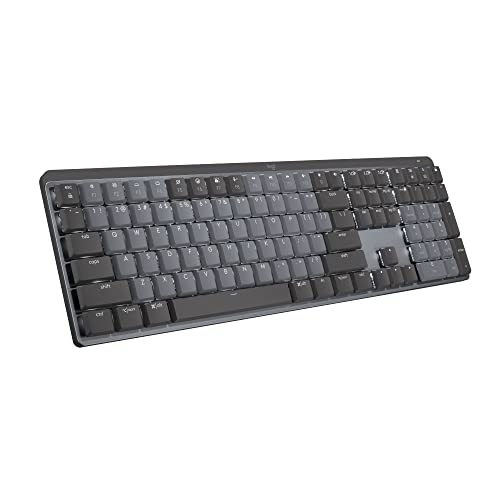
Logitech MX Mechanical Wireless Illuminated Keyboard Tactile
- Tactile quiet switches
- Smart illumination
- Flow support
- Up to 3 devices
Logitech's MX Mechanical is a full-size low-profile keyboard with tactile quiet mechanical switches and low profile keys for a more comfortable layout. It pairs with up to 3 devices through Bluetooth Low Energy or the included Logi Bolt receiver, and Smart illumination lights the keys when your hands approach. Logi Options+ adds customization for Fn keys and backlighting.
This is a good fit if you want a familiar full-size board with low-profile mechanics and automatic backlighting. The plastic build keeps it lighter than metal-framed options, and the multi-OS pairing can suit mixed-device setups. It is especially appealing if you want a keyboard that leans toward comfort and quiet feedback.
RK ROYAL KLUDGE N80 Low Profile Mechanical Keyboard w/Smart Display Screen

- Built-in screen
- Knob control
- Tri-mode connectivity
- Sound-absorbing layers
RK ROYAL KLUDGE's N80 adds a compact screen and a knob, so you can check custom GIFs, dates, modes, and battery status at a glance. It offers Bluetooth 5.0, 2.4GHz wireless, and USB-C wired use, and the low-profile switches shorten the actuation distance for quicker response. The top-mounted structure and sound-absorbing layers are meant to keep typing steadier and quieter.
Choose this if you like extra on-board control and visual feedback without moving to a larger layout. The heavy-duty base is meant to reduce wobble, and the display can help you stay oriented across modes and layouts. It suits users who want a compact keyboard with a more feature-rich front panel.
Cherry MX 10.0N RGB Mechanical Keyboard MX Low Profile Speed switches

- Ultra-thin profile
- Low profile speed switches
- RGB backlighting
- Integrated stand
Cherry's MX 10.0N RGB is an ultra-thin keyboard at 0.87 in with low profile speed switches and RGB backlighting. The aluminum housing gives it a clean, sturdy feel, and the integrated fold-out stand adds another angle for typing comfort. It stays simple while still covering the essentials for work and gaming.
This is a strong pick if you want a very slim keyboard that does not pile on extra controls. The linear, quiet, responsive switches suit fast typing, while the adjustable lighting lets you personalize the look. It is a clean choice for someone who values a low, sleek profile above extra features.
nuphy Air60 V2 Portable Wireless Keyboard 60% Low Profile Mechanical Keyboard

- 60% layout
- QMK/VIA support
- Connects 4 devices
- Up to 150 hours
- No F area
nuphy's Air60 V2 is a 60% board with 64 keys, QMK/VIA support, and Bluetooth 5.1, 2.4GHz, plus USB-C wired connectivity. Its smaller size comes from leaving out the F area, and it can connect to up to 4 devices at once. The aluminum frame also adds two RGB light bars that show connection, battery, and system status.
Pick this if you want a compact keyboard that is easy to carry and easy to tailor across systems. The 2500 mAh battery is listed with up to 90 hours of use with all lights on and up to 150 hours with the lights off. It suits users who want a smaller board without giving up remapping support.
Hexgears GK1702 Full Size Low Profile Mechanical Keyboard

- 70 million keypress lifespan
- Volume roller
- 5-device wireless support
- NKRO
Hexgears' GK1702 is a 108-key full-size board with Kailh low profile linear switches, a durable aluminum frame, and a 27.7 mm thickness. It includes per-key RGB backlighting, a volume roller, media controls, Bluetooth 5.0, and USB-C wired connection. The 4000 mAh battery is listed for up to 360 hours of use, and NKRO adds stronger multi-key support.
Choose this if you want a feature-rich full-size keyboard for work, data entry, and gaming. The 5-device switching and long battery life make it broad in use, while the low-profile design keeps it slimmer than many full-size boards. It suits users who want more controls without moving away from a traditional layout.
Mciepny Kailh 1350 Choc Low Profile White Clicky Switches 5-Pin Pre-lubed 20Pcs

- Clicky low-profile design
- 5-pin compatibility
- 50 million lifetime
- Secure tray packaging
- Total stroke 3.2±0.5 mm
- Dwarf shaft thickness 8 mm
Mciepny's Kailh 1350 Choc Low Profile White switches are clicky low-profile switches for thin keyboard designs. They are listed as compatible with most 5-pin MX mechanical keyboards, and the 50 million keypress service life points to a long-use switch option. The package also includes a plastic tray to help keep the pins from bending.
These switches fit buyers who are replacing or building around a low-profile, clicky feel rather than buying a finished keyboard. The 50±10gf operating force and 1.5±0.5 mm trigger force describe a sharper typing feel, while the 5-pin format matters for compatibility. They suit people who already know the board they want to pair them with.
How to Choose Low Profile Mechanical Keyboards
Layout and desk space
Think first about how much room you actually need for keys, shortcuts, and a mouse. A compact board leaves more workspace, but a full-size design is easier if you rely on a number pad or dedicated media controls.
Also consider how often you switch between devices or apps. A board with a simpler layout can feel cleaner on a crowded desk, while a larger one may reduce the need for external accessories. Match the size to your habits, not just to how the keyboard looks in photos.
Switch feel and sound
Low-profile boards can still feel very different from one another. Some use linear switches for a smoother press, while others add a tactile bump or a click. If you work near other people, quieter switches are usually easier to live with, especially in shared rooms or late-night setups.
Sound also comes from the build, not just the switch style. Aluminum frames, dampening layers, and keycap material can change how solid the board feels under your fingers. When possible, look for wording that describes typing feel, not just the switch name.
Connection and software
Check whether you want Bluetooth, a wireless receiver, a wired mode, or all three. Multi-device support helps if you move between a laptop, tablet, and desktop. Wired use can matter for reliability, while wireless flexibility can keep the desk tidier and reduce cable changes during the day.
Software support matters too if you want custom shortcuts or lighting control. Some boards use web tools, while others rely on desktop apps or onboard controls.
More to Consider for Low Profile Mechanical Keyboards
Keycap Material
Keycap material can change how the board feels and how the legends wear over time. PBT often has a different texture from ABS and may resist shine better, while shine-through designs can improve visibility in dim rooms. If you care about the typing surface, look closely at the keycap notes, not just the switch type.
Battery Expectations
Wireless boards can vary a lot in runtime, and battery size is only part of the picture. Lighting, polling behavior, and how often you switch modes can all affect how long a charge lasts. If you prefer fewer interruptions, pick a board whose stated runtime fits your routine and lighting habits.
Control Extras
Knobs, screens, media keys, and shortcut rows can make a keyboard more useful without changing the base layout. These additions help if you adjust volume often, watch battery status, or move between apps all day. Choose the extras that support your workflow, because too many controls can also crowd the design.
Frequently Asked Questions
What should you look for first in a slim keyboard?
Start with layout, switch feel, and connection options. Then check whether the switches are described as linear, tactile, or clicky, and whether the board offers Bluetooth, a receiver, wired use, or multi-device support.
How do quiet and clicky switches differ here?
Keychron, ProtoArc, X9 Performance, and Logitech all lean toward quieter or tactile typing, while Cherry and Mciepny are described with more responsive or clicky styles.
Which pick is easiest to live with on a smaller desk?
Keychron uses a 75% layout, NSYCA uses a 75% layout, and nuphy uses a 60% layout, so all three save space. nuphy goes smallest because it leaves out the F area, while Keychron and NSYCA keep more navigation keys.
Which board gives the strongest shortcut or macro support?
Keychron offers QMK firmware and the Keychron Launcher web app for remapping, macros, and shortcuts. ProtoArc supports macro recording and editing, while NSYCA is fully programmable through a web-based configurator with profiles saved to onboard memory.
Which picks show the most useful battery details?
ProtoArc lists up to 150 days of standby time after 6-8 hours of charging. nuphy lists a 2500 mAh battery with up to 90 hours with all lights on and up to 150 hours with the lights off, while Hexgears lists a 4000 mAh battery with up to 360 hours.
Final Verdict
Keychron's K3 stands out for its compact 75% layout, Bluetooth 5.1 support for up to 3 devices, USB-C wired use, and open-source QMK firmware with Keychron Launcher customization. The Mac layout, included Windows and Mac keycaps, and white backlight make it a flexible pick for mixed-platform users who want a slim board with real remapping room.