10 Best Dual Monitor Stands in 2026
Disclosure: As an Amazon Associate we earn from qualifying purchases.
HUANUO is the pick for people who want a fully adjustable dual mount with both C-clamp and grommet options.
Choosing a dual monitor stands setup gets tricky when screen size, weight, desk thickness, and mounting style all have to line up. If one detail misses, the stand may not fit your workspace or displays cleanly.
These picks suit different desk layouts, screen sizes, and adjustment needs.
Top Picks
Top 10 Dual Monitor Stands Review
Pros and cons are taken from each product's listing details.
HUANUO FlowLift™ Dual Monitor Stand

- Fully adjustable arm movement
- C-clamp and grommet mounting
- Supports 13 to 32 inch screens
- Built-in cable management
HUANUO combines full-motion positioning with two mounting choices, so it suits people who want flexibility at the desk. The listing says each arm holds 4.4 to 19.8 lb and fits 13 to 32 inch screens with VESA 75×75 or 100×100 mounting holes. It also includes a C-clamp base and a grommet option for desks in the stated thickness range.
This stand is a strong match if you want to fine-tune tilt, swivel, rotation, and height while keeping the setup tidy. HUANUO also describes built-in cable guides and a raised screen position that can free desktop space for a keyboard, notebook, or docking station. It works best when your desk and monitors match the stated fit limits.
VIVO Dual Monitor Desk Stand

- Freestanding glass base
- Fits 13 to 32 inch screens
- Portrait or landscape placement
- Removable VESA plates
- Base needs enough room on the desk
VIVO is a good fit if you want a freestanding setup with a tempered-glass base instead of a clamp. The listing says it fits 13 to 32 inch screens up to 22 lb each with 75×75 or 100×100 mounting holes. It also uses steel for the pole and arms, which adds to the sturdy build described on the page.
Choose this one if you want flexible screen placement with tilt, swivel, rotation, and height adjustment along the center pole. VIVO also notes removable VESA plates for simpler mounting. It suits a clean desk layout where a rectangular glass base is acceptable and you want the monitors in portrait or landscape mode.
Perlegear Dual Monitor Stand with Power Strip

- Built-in power strip
- USB-A, USB-C, and AC outlets
- Four height settings
- Sturdy tempered-glass base
Perlegear is the pick for anyone who wants monitor support and desktop power in one setup. The listing says it fits most 13 to 32 inch flat or curved screens up to 22 lb per arm with VESA 75×75 or 100×100 patterns. It also includes a built-in power strip with a 6.5 ft cable, one USB-A port, one USB-C port, and three AC outlets.
This stand makes sense if your desk needs both cleaner cable routing and easier access to charging. Perlegear also lists four height settings, so you can fine-tune your view without giving up organization. It is a solid option for a shared work area where power access matters as much as screen support.
ErGear Dual Monitor Stand

- Heavy-duty adjustable arms
- Two installation options
- Supports 13 to 32 inch monitors
- Cable management clips
- Wooden table recommended
ErGear suits people who want a strong, adjustable mount for two screens without a lot of setup guesswork. Each monitor can be 13 to 32 inches, weigh up to 17.6 lb, and use 75×75 or 100×100 VESA holes. It also offers both C-clamp and grommet mounting options for a wooden table within the stated thickness limits.
Pick this one if you want broad adjustment and a long arm span for a more immersive desk layout. ErGear describes tilt, swivel, rotation, and cable management clips that help keep the area neat. It is a practical choice for a workstation that needs strong support and adjustable screen placement.
gianotter Dual Monitor Stand Riser With Drawer and 2 Pen Holders

- Drawer and pen holders
- No assembly required
- High-strength metal build
- Raises monitors off the desk
gianotter works well if your main goal is organizing a crowded desk rather than using articulated arms. The listing highlights a drawer, two magnetic pen holders, and a monitor riser design that lifts screens higher on the desktop. It also says no assembly is required, which keeps setup simple.
Choose this one when you want storage and a cleaner work surface in one piece. gianotter also describes high-strength metal materials and space underneath for accessories like a mouse or keyboard. It is a straightforward option for people who want an organized top-of-desk shelf with extra compartments.
MOUNT PRO Dual Monitor Stand

- Full motion adjustment
- V-shaped base with phone groove
- Clips for cable management
- Works better with two monitors of the same weight
MOUNT PRO fits smaller screen setups that still need tilt, swivel, rotation, and height adjustment. It works with most 13 to 27 inch monitors up to 17.6 lb each and uses VESA 75×75 or 100×100 mounting holes. Its V-shaped base is described as heavy and wide, with a groove for a phone.
This stand suits people who want a neat desktop and a smaller footprint than a larger-arm mount. MOUNT PRO also includes cable clips and labeled parts for assembly. It is a sensible choice if your screens are in the stated size range and you want a compact freestanding arm.
WESTREE Dual Monitor Stand Riser
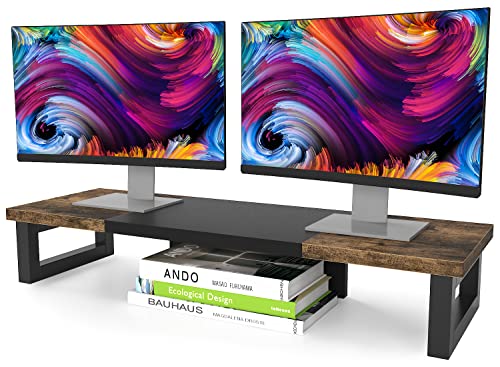
- Rustic wood finish
- Extra storage underneath
- Pre-drilled holes
- Works as a riser or stand
WESTREE is for buyers who want a simple riser with a warm wood look and extra room underneath. It uses wood and steel legs, with anti-slip pads you can install for added stability. It is described as a monitor riser that can also support other desktop uses.
Choose this one if you want a fixed shelf style rather than a moving arm. WESTREE also says the board and frame come with pre-drilled holes, tools, parts, and instructions for fast assembly. It suits a setup where storage, surface space, and a rustic finish matter more than articulation.
Hemudu Dual Monitor Stand
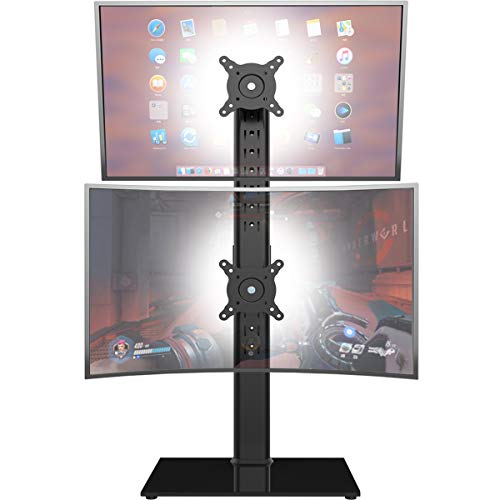
- Vertical stacked layout
- Fits up to 34 inch screens
- 12 level height adjustment
- Removable VESA plates
Hemudu stands out for a vertical stack layout that keeps two screens on one column. It fits screens up to 34 inches and 44 lb each, with 50×50, 75×75, or 100×100 mounting holes. It also includes integrated cable management and removable VESA plates.
This is a good match if you want more height than width on the desk. Hemudu offers +50° to -50° swivel, +10° to -15° tilt, and 12 level height adjustment along the center pole. It suits a workspace that needs a tall, space-saving monitor arrangement.
Bracwiser Dual Monitor Stand Free Standing Desk Mount

- Supports larger screens
- Wooden base design
- Up to 22.8 in height
- Built-in cable management
- Screens must not extend beyond the phone slot to prevent tipping over
Bracwiser suits buyers who want a freestanding arm for larger, heavier screens. It holds two 17 to 40 inch monitors up to 26.45 lb each and supports VESA 75×75 or 100×100 mounting holes. Its wooden base and aluminum-and-steel arm build are described as part of the stability-focused design.
Pick this one if you want broad adjustment with tilt, swivel, rotation, and a tall height range. Bracwiser also includes a built-in cable management system and a base groove for phones, tablets, notes, or pens. It fits users who need a more substantial stand for a bigger workspace.
WALI Freestanding Dual Monitor Stand for 13-27 inch Screens
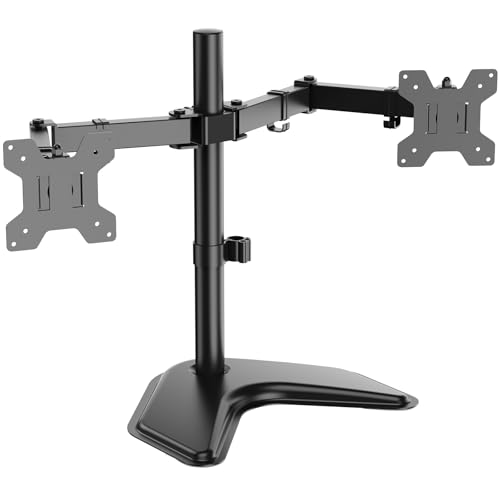
- Free-standing V-base
- Detachable plates
- Full motion movement
- Cable management along the arms
- Fits monitors up to 27 inches
WALI is a choice for people who want a freestanding dual setup with a simple, modern look. It fits screens up to 27 inches, supports 22 lb per arm, and uses 75×75 or 100×100 mounting patterns. The V-base is described as stable and made to sit on most desks.
Choose this one if you want height adjustment, tilt, swivel, and rotation without a clamp. WALI also includes detachable plates and cable management along the arms. It works well for a tidy workstation where the stand has to stay neat and easy to position.
How to Choose Dual Monitor Stands
Check screen fit
Start with the screens themselves. The stand has to match size, weight, and VESA pattern all at once, so a close look at those three details saves frustration later. If either screen is outside the stated range, the setup can become awkward or unusable.
Measure the monitors and check the mounting holes before you buy. It also helps to think about whether both displays are the same weight, since some arms stay steadier when the load is balanced. That simple check can make positioning much easier.
Match the desk
The desk matters just as much as the monitors. Clamp and grommet styles need enough thickness, a solid surface, and enough room underneath for the hardware. A desk with beams, panels, or fragile materials can get in the way of a secure fit.
Freestanding bases avoid clamp limits, but they need enough flat space on top. Before choosing a design, look at how much desktop room you can spare and whether you want the stand fixed in place or moved around later.
Think about motion
Different stands offer different ranges of movement, and that changes how comfortable the setup feels. Tilt, swivel, rotation, and height adjustment all help you place screens at a better angle for the way you sit and work.
If you switch between typing, reading, and video calls, more movement can help. If you prefer a simpler setup, a shelf-style riser may be enough. The best choice is the one that matches your daily habits without adding clutter.
More to Consider for Dual Monitor Stands
Cable control
A tidy cable path can make a desk feel less crowded and make the whole setup easier to use. Look for clips, channels, or built-in routing paths if you want cords kept close to the frame instead of hanging loose behind the monitors.
Base footprint
The footprint matters when desk space is tight. A wider base can add stability, while a smaller footprint leaves more room for accessories. Think about how much of the surface you want to keep open for a keyboard, notebook, or docking station.
Assembly effort
Some stands arrive with removable plates, labeled parts, or pre-drilled holes that simplify setup. If you want less time spent building, check whether the design is meant for quick assembly or needs more careful alignment before the monitors go on.
Frequently Asked Questions
What should you check before buying these stands?
Check screen size, screen weight, and VESA pattern first, because those three details decide whether the monitors will mount correctly.
Which option is the easiest to set up?
gianotter is the simplest because it says no assembly is required.
Which model suits a larger monitor pair?
Bracwiser is the broadest fit for larger screens because it holds two 17 to 40 inch displays up to 26.45 lb each.
Which stand gives the most desktop storage?
gianotter gives the most obvious storage with a drawer and two magnetic pen holders. WESTREE also adds space underneath for office supplies, printer use, laptop use, or other desktop items.
Which choices support cable management?
HUANUO, Perlegear, ErGear, MOUNT PRO, Hemudu, Bracwiser, and WALI all mention cable management of some kind.
Final Verdict
HUANUO is the strongest overall choice for shoppers who want a flexible dual mount with full-motion adjustment and two installation styles. It fits 13 to 32 inch screens, supports the stated weight range on each arm, and uses both C-clamp and grommet mounting for wooden desks within the listed thickness limits.